Why your reel doesn't reach your followers
The reel reaches neither followers nor anyone else: in the Reels feed, follows and recommendations share one set of a hundred slots. Three insight numbers that diagnose it, and one Reels lacks.
- Social media & AI
- Problem breakdown
- ≈ 11 minutes
A thousand followers, two hundred views on the reel. From there the argument is usually about who exactly stopped being shown it: your own people or everyone else. The platform has the answer written down, and it is that following gives a reel no queue of its own.
The two funnels a reel travels to reach a viewer, and how their numbers differ. Three metrics that give you the diagnosis, and one that Reels doesn't have. Eleven-minute read.
The home feed and the Reels feed are built differently
One reel, two different routes to the viewer, and their numbers differ fivefold.
A reel reaches a person in two ways, and the platform describes them in separate documents. The difference between them explains almost the whole argument about “your people and everyone else”.
The home feed gathers your follows. A lightweight model picks around 700 of the most relevant posts, then a relevance score is calculated for about 500 of them. Recommended content is added there by a separate system, and the card's page carries a separate note saying so.
The Reels feed gathers differently. It takes in “reels from people or accounts you follow, and videos similar to those you have recently engaged with”. A lightweight model selects around 100 reels, and a relevance score is calculated for roughly the same 100.
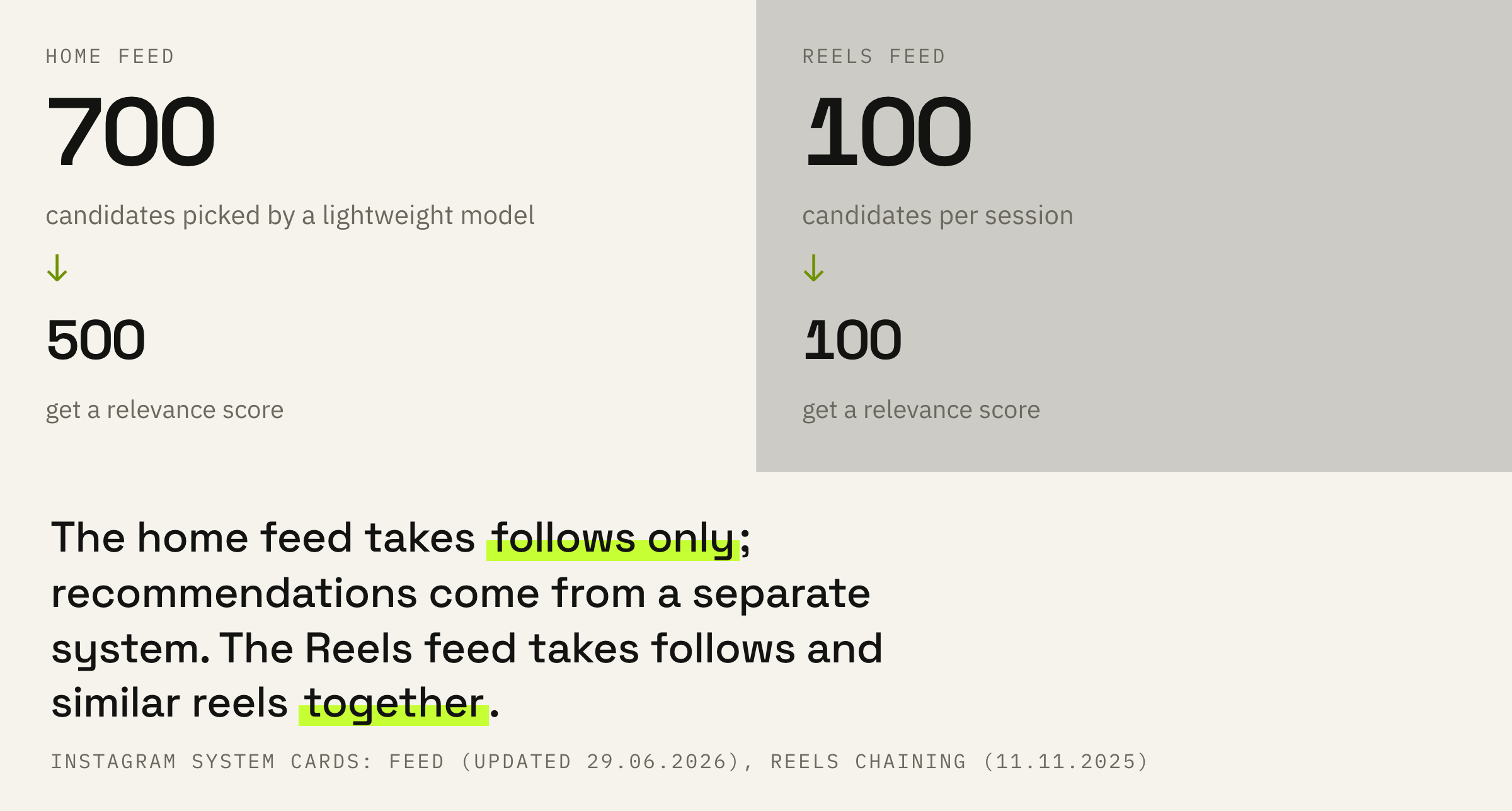
In the Reels feed, following gives your reel no queue of its own. It sits in the same candidate set as other people's reels that the system judged close to the viewer's interests, and shares a hundred slots with them.
A follows-only feed does exist, but you turn it on by hand. In the Reels feed you tap “Following”; on a tablet it's “For you”, then “Recent”. In the home feed the same thing is done through “Following” on the home screen. By default a person sees neither.
Why the reel doesn't reach your followers
Three causes, and none of them is a ban.
The first cause is arithmetic. A follower opens the Reels tab, and around a hundred candidates are gathered for the whole session. If that person follows two hundred accounts, your reel competes with all of them and with recommendations too.
The second cause is in the signals. The system looks at what the viewer did before: who they followed recently, what they engaged with, what they liked. A follower who hasn't opened your reels for six months looks different to the system from one who opens them every day.
The third is duration. In the watch-through prediction the platform compares a viewer against people who watched reels of the same duration, and duration is named in the signals outright. A one-minute reel competes with one-minute reels, not with fifteen-second ones.
How likely you are to watch more of a reel than 95% of users who watched reels of the same length.
One of the nine predictions, “Instagram Reels Chaining AI system”
Which gives a practical conclusion that saves months. Shortening a reel for the sake of a watch-through percentage doesn't help the way people assume: a short reel is compared against short ones, and it has a bar of its own.
Why the reel doesn't reach anyone else
This is where the second bar applies, and it is stricter than the first.
Showing your reels to people who don't follow you is what the platform calls recommendations, and it keeps a separate set of rules for them. The wording is direct: for content from accounts a person doesn't follow, the standards “should be stricter”, and the Recommendations Guidelines are set to a higher bar than the Community Standards.
Note that these guidelines only apply to public accounts and recommendations to people who don't follow you. Even if you're not eligible to be recommended, your content can still show up for your followers.
“Recommendation eligibility on Instagram”, Help Centre
That quote gives you a ready fork in the road. Followers see the reels but nobody else does — look at recommendations. Nobody sees them at all — recommendations aren't the issue.
Settings, then “Additional information and support”, then “Account Status”. For this article one line on that screen matters: whether your reels are eligible for “Reels”. The other items on the screen, the sample violations and the review request are covered in the article on account status.
This screen has two catches that people usually discover late. The recommendation rules cover the whole profile, including the profile photo and the bio. And part of your content is enough: if the account doesn't meet the conditions, nothing gets recommended.
The Help Centre's caveat, verbatim: “Note that your eligibility for recommendations doesn't guarantee that your content will be recommended.” It's admission to take part, not a promise of reach.
If your reels have stopped reaching both your own people and everyone else, we'll look at your account and tell you which of the two routes is losing the views.
Five reel metrics and one that isn't there
The place where people most often diagnose things using a number that doesn't exist.
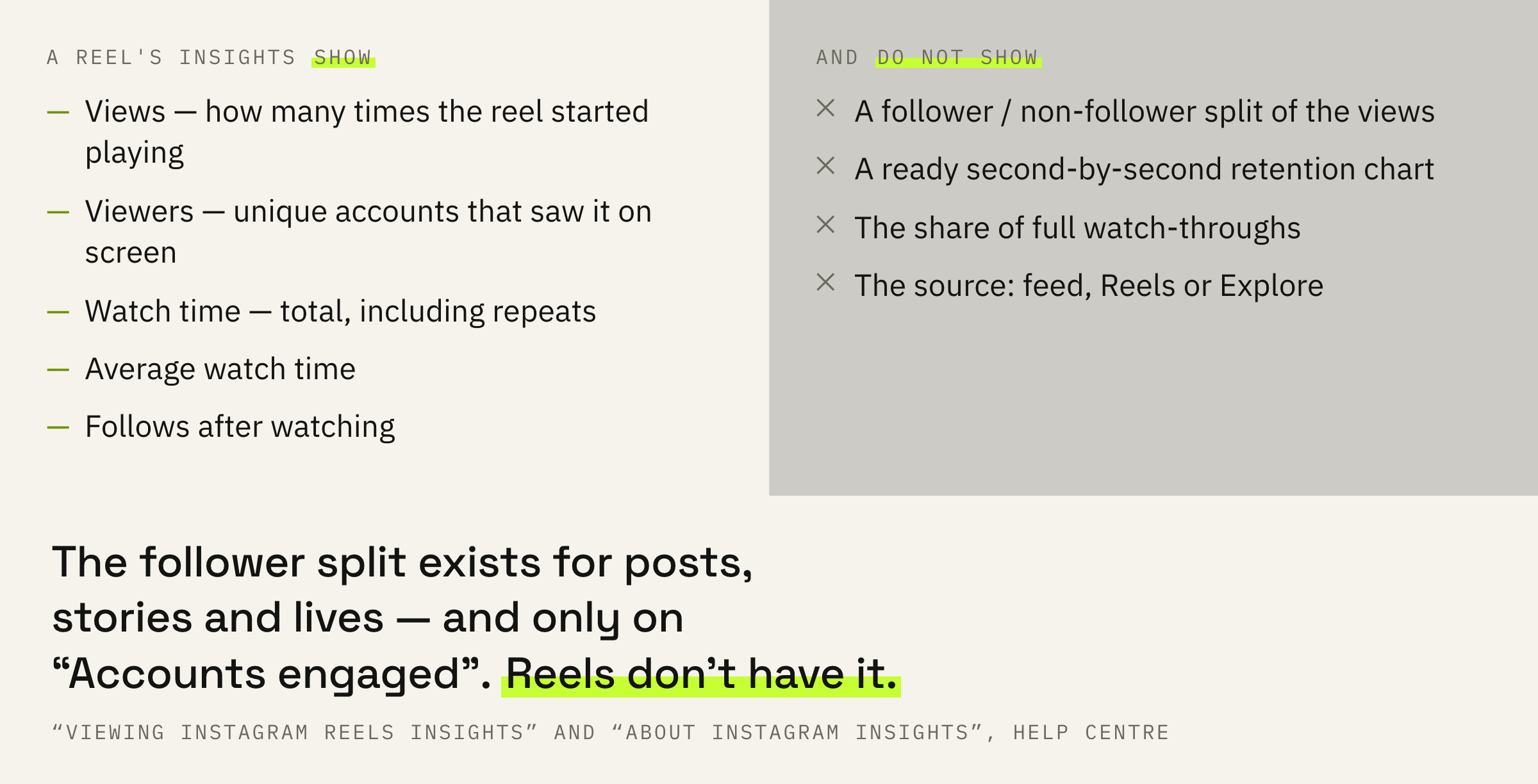
A reel's insights open like this: the Reels tab in your profile, the video you need, “View insights”. The Help Centre sets two limits on them: reels posted on or after 14 May 2021, and two years from the first publish date — older reels have no numbers left.
The definitions below are from the Help Centre article “View insights on your Instagram reels”, verbatim.
Reels have no follower / non-follower split in their insights. Posts, stories and lives do, and only on the “Accounts engaged” metric. So the phrase “my views from non-followers dropped” can't be checked directly against a reel's insights, and any service that shows such a split for Reels is not taking it from Instagram's stats.
That is a limitation of our own breakdown too. We diagnose indirectly, with the three numbers below, and we say plainly that this is an inference, not a measurement.
The definitions of two metrics imply one subtlety. In “Average watch time”, repeat plays land in the numerator but not in the denominator: only initial plays are counted there. So a short looping reel gets an inflated average, and comparing reels of different lengths by it is pointless.
Three numbers that give the diagnosis
Five minutes per reel, and the guessing stops.
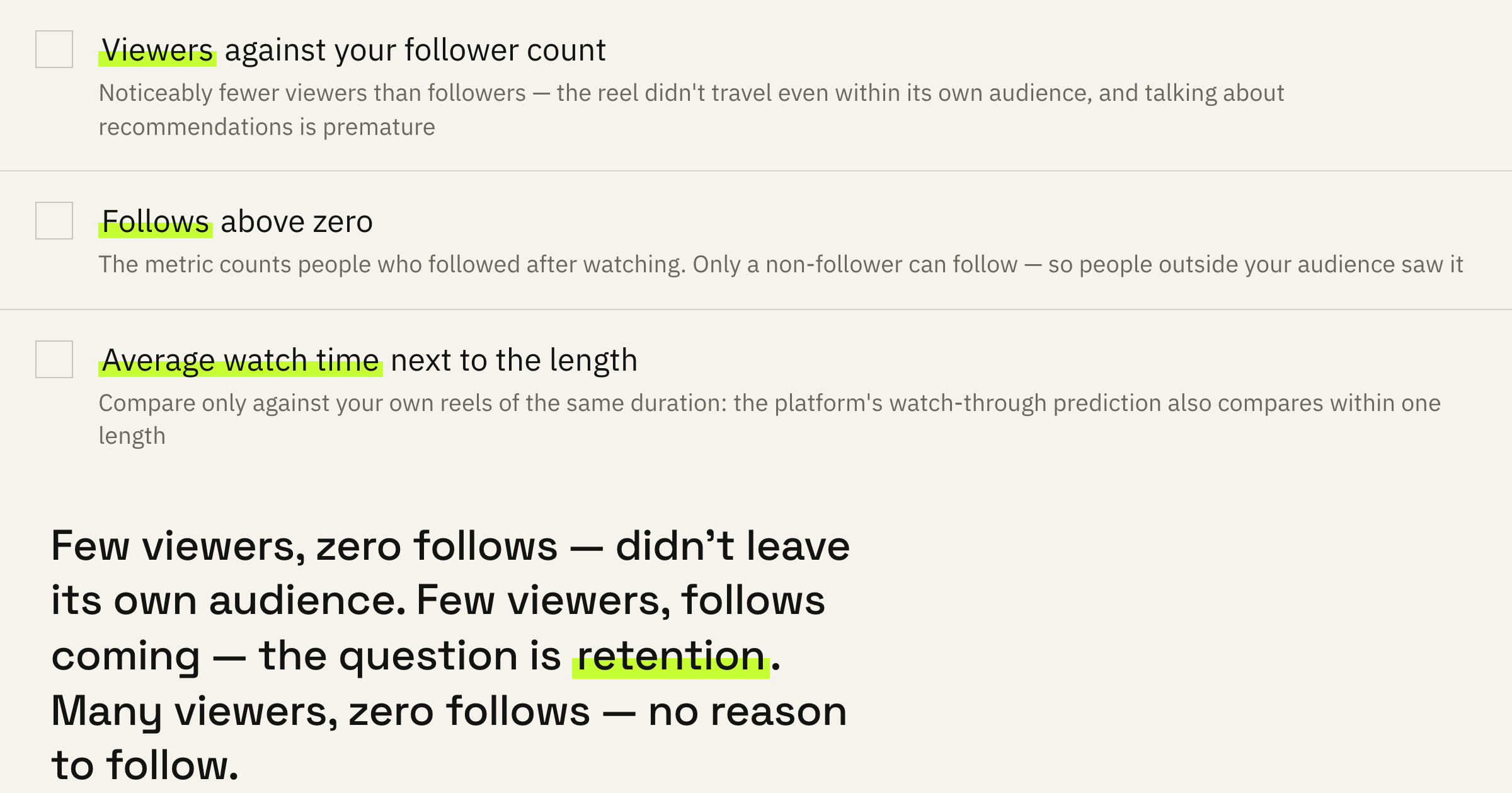
The first number: “Viewers” against your follower count. If viewers are noticeably fewer than followers, the reel didn't travel even within its own audience, and talking about recommendations is premature.
The second number: “Follows”. The metric counts accounts that followed you after watching, and only someone who isn't following you yet can follow. So any number above zero proves that people outside your audience saw the reel.
The third number: “Average watch time” next to the reel's duration. Compare it against your own reels of the same length, because the platform's watch-through prediction also compares viewers within one duration.
Few viewers and zero follows — the reel didn't get beyond a small part of its own audience. Few viewers but follows coming in — you are being shown to other people, just not much, and the question is retention. Many viewers and zero follows — the reel gets watched but gives no reason to follow.
If the reel has low figures from the start across all three numbers, the breakdown is better started with the diagnosis of reels stuck at 200–500 views.
What to change this week
Four steps; change one at a time.
First: the first two seconds. Among the signals behind the three-second-view prediction, the system card lists “how many times the post has been skipped within 2 seconds of being opened”. You have no shorter window, and this one is entirely yours.
Second: sound. In the same signals sits how many times the reel was watched with the sound on. A silent opening and full-frame text work against that signal.
Third: length. Since the comparison happens within one duration, choose it deliberately and hold it for a week. Changing length every day stops you comparing your own results.
Fourth: a reason to forward it. Separate predictions cover resharing and whether you will share the reel outside Instagram. A reel you want to send to someone you know picks up two predictions at once.
After two weeks open five new reels and five older ones and compare the three numbers for each. Changed one thing — you'll see what helped. Changed everything at once — you'll find out only by accident.
What not to do
Four reactions that lead away from the cause.
The opposite mistake is to go quiet until the cause is found. The signals the system uses to gather candidates look at the viewer's recent activity with the author, and a pause doesn't improve them.
What to do next
One table for five reels.
Take your last five reels and write out three numbers for each: “Viewers”, “Follows” and “Average watch time” next to the duration. That is five minutes of work and a ready answer to where the views are being lost.
Then change one thing at a time: first the opening two seconds, then the sound, then the length. Two weeks per change, or the result will blur into the normal fluctuation.
We'll look at ten of your reels, break them down by the three numbers and tell you which of the two routes is losing the reach.
If you want your reels to reach both your own people and everyone else — leave a request. We'll get in touch if there are slots available at the moment. There is usually a queue and a wait.