Why Instagram reach dropped and what to check first
How to tell a real reach drop from normal fluctuation using Instagram's own stats, what the “Account status” section shows, and three reactions that make things worse.
- Social media and AI
- Diagnosis
- ≈ 9 minutes
The account was working, then reach dropped by half. Below is what to check, in order, and why the first thing that comes to mind usually isn't the real cause.
Two screens inside Instagram itself that show what happened, and what to do after checking them. Nine-minute read.
First, check what you're comparing against
The feeling that “it got worse” and the actual numbers disagree more often than you'd think.
Feed reach always fluctuates, and the first question isn't “why did it drop” but “dropped compared to what.”
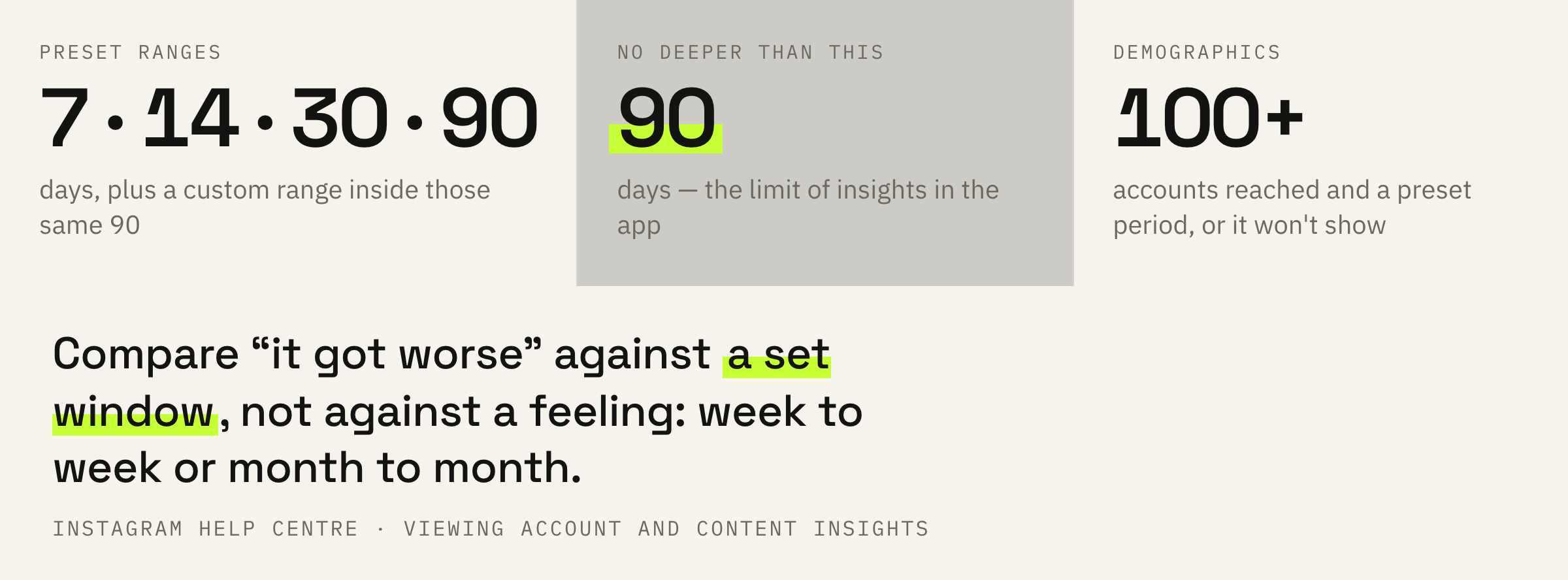
Instagram only gives stats for the last 90 days. There are five ready-made periods: 7, 14, 30, and 90 days, plus a custom range within those same three months.
So you can't compare this week to the same week a year ago inside the app. Take two neighboring periods of equal length and compare them to each other.
On instagram.com, open “Dashboard” in the left menu, then “Insights,” then “Account” or “Content,” and pick a range. If there's no stats at all, the account is private: private accounts don't get shown insights. After switching back to public, data recovers within 90 days.
Follower demographics are usually not there yet in the first week: the platform opens them only for a preset period, and only once that period has gathered more than a hundred reached or engaged accounts.
Some metrics Instagram labels as estimated and in development — it says so right inside the insights. Chasing a difference of a few per cent in those is pointless.
Where the reach was coming from and where it went
Followers and recommendations are two separate faucets.
Impressions come from two places. Followers see you in their feed; everyone else sees you through recommendations: Feed, Search, Explore, Reels, and Suggested Accounts.
Instagram describes the line between them with a rule that gives you a ready-made diagnosis. Even when an account stops qualifying for recommendations, followers still see its content.
That's the fork in the road. If reach among non-followers dropped but followers' reach held steady, the issue is recommendations. If both dropped, the cause isn't there.
Settings, then “Additional information and support”, then “Account Status”. For a professional account this screen answers one question: is it allowed into recommendations, and if not, because of which posts. The button to request another review is here too.
Three things in this section catch people off guard more than anything else.
And a caveat the platform states itself: meeting the conditions doesn't guarantee a spot in recommendations. It's eligibility, not a promise.
Why the drop isn't even everywhere
Feed, Explore, and Reels each have different signals.
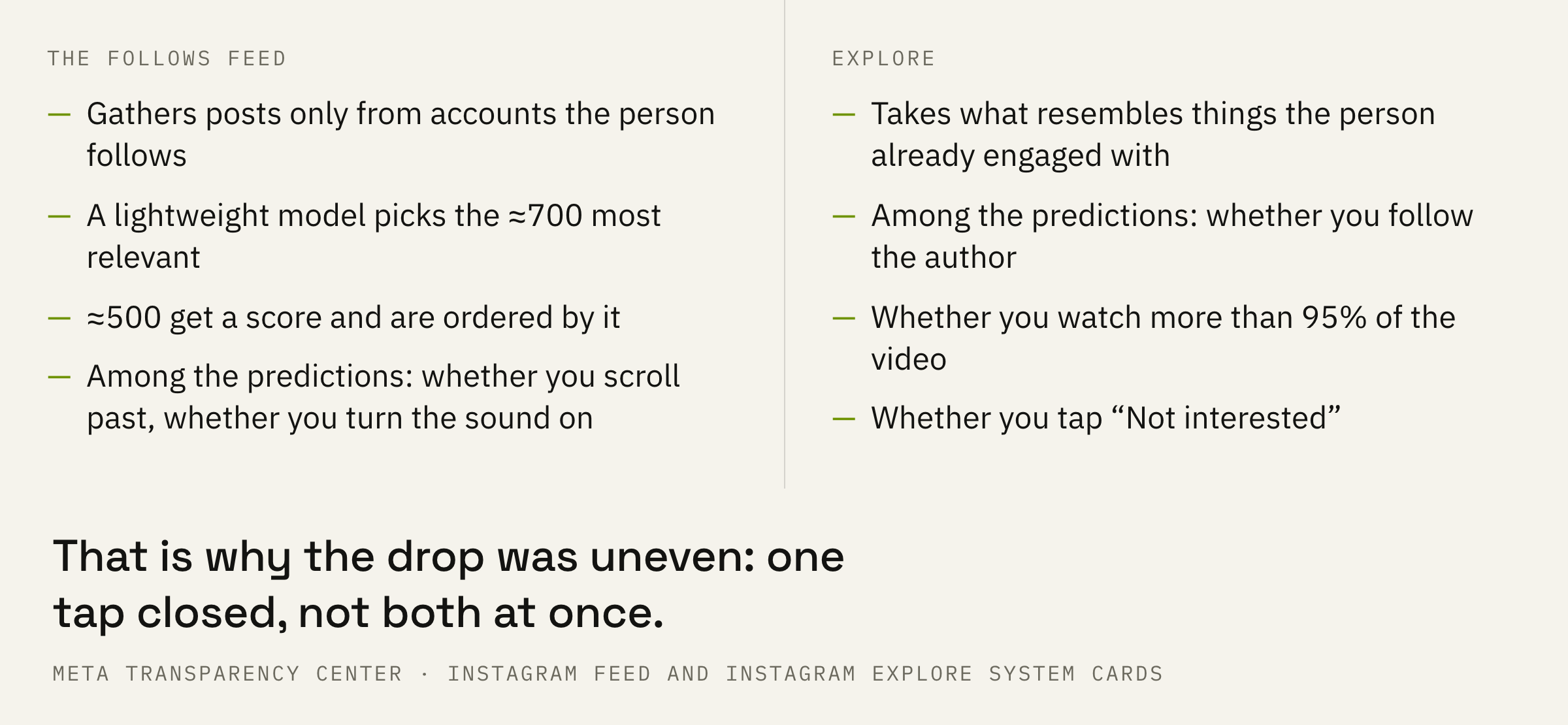
Instagram publishes its ranking signals separately for each surface and notes that the order in the lists roughly follows importance. The lists don't match, and that explains why reach drops unevenly.
On Explore, a post's popularity comes first; in the feed, it's second after the viewer's own activity.
The practical takeaway is simple. If reach among non-followers dropped while followers' feed reach held up, look at the response in the first few hours: it matters most where you're being shown to strangers.
Reels has its own list, where the video's own data only ranks third, after viewer activity and their history of interacting with the author.
We once decided the algorithm was to blame. We posted more, reach kept falling, and the explanation seemed obvious. The real culprit was our own plan for 480 pieces of content, not the platform.
What it looked like in full — in the breakdown of the 480-piece content plan.
A week's worth of actions
Three steps, one change at a time.
Step one: if “Account Status” shows complaints, fix them and wait. Nowhere else does the platform name the cause itself, and arguing with this screen is pointless.
Step two: if there are no violations but your posting frequency went up, drop back to the previous one for two weeks. There's no cheaper check than that.
Third: if frequency hasn't changed either, change the hook. Change how the video opens, the first second and a half. The topic and niche stay the same.
One of our clients had a ceiling of 300,000 views. We looked at the insights to see at which seconds people drop off and combined the expertise of a studio shoot with the pace of viral reels. The first reel made under the new scheme collected 1,800,000 views, and it didn't need two days to do it.
Change one thing at a time. Change frequency, hook, and topic all at once, and you'll only find out what worked by accident.
If your reach has dropped and you don't know where to start, we'll look at your account and tell you exactly where the views got lost.
What not to do
Three reactions that make things worse.
The opposite extreme — freezing until the cause is found — is no better. Regularity is the one thing to keep no matter what: one post a day, every day, beats seven on Monday and then silence.
Consistency and volume are different things. One heals, the other breaks.
What to do next
One action for this week.
Open two screens in a row. First, the thirty-day stats against the previous thirty days, then “Account Status.”
Then check one item at a time and wait two weeks for each. That way you get an answer instead of a guess.
We'll look at your profile, tell you which formats will bring reach specifically in your niche, and calculate how long it'll take to pay off.
If you want your reach to stop being a lottery — leave a request. We'll get in touch if there are open slots right now. Usually there's a waitlist, so you may have to wait.