Message requests on Instagram: where a client's message sits
A message from someone outside your following goes to the requests folder and never reaches the Chats list until you accept it. One setting closes them off entirely.
- Social media and AI
- How it works
- ≈ 8 minutes
“The client says they sent a message and I have nothing” is a conversation that repeats every week. The message is usually there. It is just that from a stranger it goes into the Message Requests folder and never reaches the Chats list until it is accepted by hand. And one setting makes it possible not to receive such requests at all.
Where a message from someone you do not follow sits. Why it does not rise into the Chats list on its own. Which setting closes incoming messages off entirely and what it does not affect. What blocking changes. What limits Direct itself has. Eight minutes of reading.
Until you accept it, it is not in Chats
The line that explains vanished messages.
Start with the line that closes the question entirely.
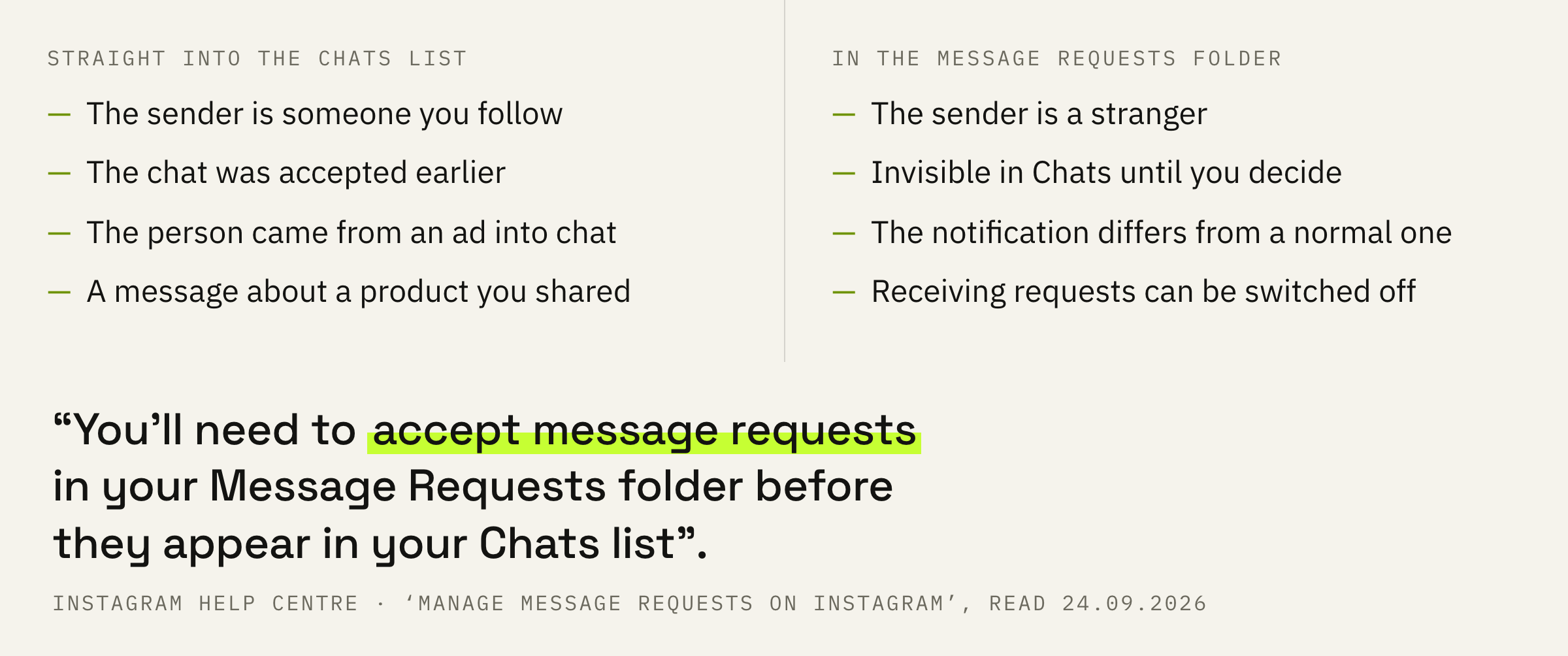
Note that you’ll need to accept message requests in your Message Requests folder before they appear in your Chats list. Messages from people you follow on Instagram will appear in your Chats list.
Instagram Help Centre · ‘Manage message requests on Instagram’
Both rules are named here at once. A message from someone you follow lands in the Chats list. A message from everybody else goes into the requests folder and rises into Chats only after you have accepted it.
For a personal account that is a trifle. For a working one it is a straight loss: a client who found you and wrote is by definition not in your following yet.
We will look at your whole Direct: the requests folder, the receiving settings and the filters, and tell you how many enquiries are sitting where you never read them.
The same folder explains a second common complaint: reach grows while enquiries seem absent. Some of them are there, just lying in a list other than the one you open every day.
The setting that closes incoming messages
A switch people find out about by accident.
The folder has a setting of its own, and the choice there is wider than it looks.
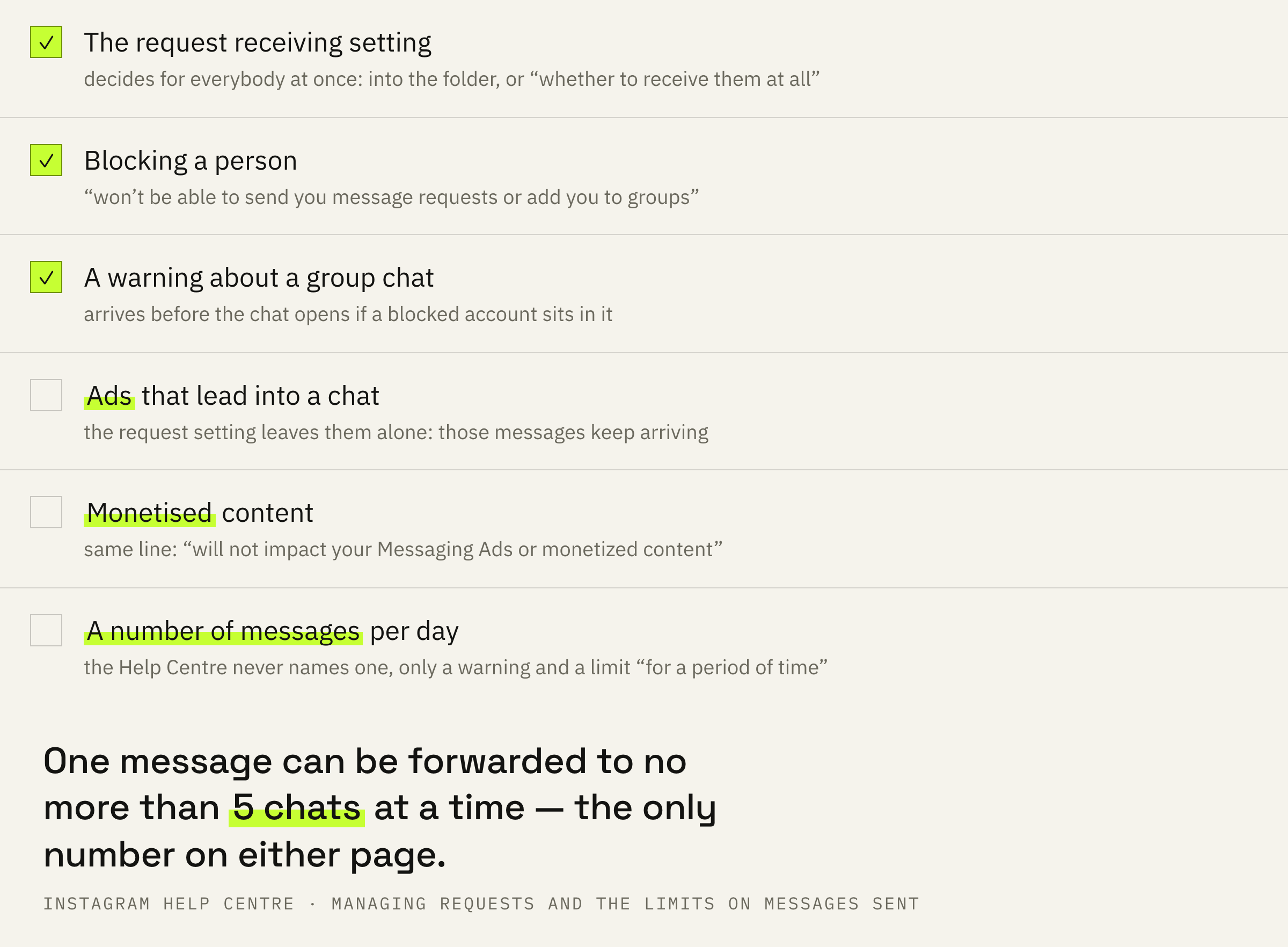
Choose whether message requests from people on Instagram go to your Message Requests folder or whether to receive them at all.
Instagram Help Centre · the same page
So there are two options. Either requests pile up in the folder and wait for a decision, or you stop receiving them altogether. The second mode helps someone buried by strangers and hurts someone waiting for clients.
This switch is worth checking at least once, even if you never touched it. The setting may have been put in place long ago for a different purpose, while what it decides is whether enquiries from new people reach you.
A separate tool for filtering the inbox lives next to it in the settings, and the two should not be confused: hidden words remove what is unwanted by the content of the message, while this setting decides the fate of every request at once.
Ads and monetisation stay
An important caveat for anyone buying traffic.
Having closed requests, it is easy to decide the whole way in is closed, but the Help Centre corrects that idea.
Changes to your message request setting will not impact your Messaging Ads or monetized content. You can still receive messages from others through your ad campaigns and products you've shared.
Instagram Help Centre · the same page
Ads that lead into a chat live by their own rules. Someone who came from such an ad will write to you regardless of what the request setting says. The same goes for messages about products you have shared.
The practical meaning is that the switch closes the organic flow of strangers and leaves the paid one alone. If you run ads into chats, closed requests will not cut your funnel.
What blocking changes
The hard option and its side effect.
The third tool works on a single person and differs from the request setting.
Accounts you’ve blocked won’t be able to send you message requests or add you to groups. If the account you’ve blocked is in a group chat you’ve been added to, you’ll be notified before you join the chat.
Instagram Help Centre · the same page
Blocking closes one person off rather than the whole flow. A blocked account will not send a request and will not add you to a group.
The second half of that line describes a situation few people know about in advance. If you are added to a group chat where a blocked account sits, the warning arrives before the chat opens. The decision stays yours.
Five chats and a warning
Now from the side of the person writing.
Direct has limits for the sender as well, and the first of them is an everyday one.
Keep in mind that you can only forward a message to up to 5 chats at a time.
Instagram Help Centre · ‘Why are there limits on the number of messages sent on Instagram?’
Forwarding one message to 5 chats at once is the ceiling for a single action. A mailout across a base done through forwarding is bounded by exactly that.
The second limit is more serious and is described as a consequence.
If you were warned about sending too many messages and continue to do so, you may not be able to send more direct messages for a period of time.
Instagram Help Centre · the same place
The scheme has two steps: a warning first, then a temporary limit on access to Direct. Neither a number of messages per day nor a length for that limit is named by the Help Centre, and any such figure on a blog comes from somebody's experience rather than from the document.
The order of steps and three mistakes
Five steps if Direct is a working channel for you.
First: open the requests folder and read it to the end. Messages from everyone outside your following sit there, and some of them are dated a month back.
Second: check the setting for receiving requests. If it is closed, new people do not reach you at all, and reach has nothing to do with it.
Third: make a habit of looking into the folder on a schedule. A request notification looks different from a notification about a message in Chats and gets lost among the rest.
Fourth: keep the tools apart. The request setting decides for everybody at once, blocking decides for one person, and the disappearing messages mode is about something else entirely.
Fifth: do not reply with a scattergun mailout. Forwarding is capped at five chats at a time, and large volumes are met by the platform with a warning and a temporary limit. What else goes on inside a chat is worth knowing separately.
Open Direct and compare two numbers: how many unread sit in the Chats list and how many in the requests folder. If the second figure is above zero, you have just found enquiries you had not seen.