Meta AI in your DMs: 30 days of chat and levers instead of a switch
An AI feature in a chat is used by any participant, and messages from the past 30 days are shared. The chat control section holds no off switch.
- Social media & AI
- Mechanics explained
- ≈ 7 min
Arguments about Meta AI in DMs usually run like this: turn it on or leave it off. The Help Centre describes a different fork. An AI feature is used by any participant of the chat, and at that moment messages from the past 30 days are shared. Among the controls the platform lists for a chat there is no general off switch.
The exact period for which messages are shared. Who opens access to the conversation besides you. The platform's direct warning about passwords and finances. Four levers the Help Centre calls chat control. What all this means for talking to a client. Seven minutes of reading.
Messages from the past 30 days
The only number on the whole page.
Let us start with the figure the whole breakdown rests on.
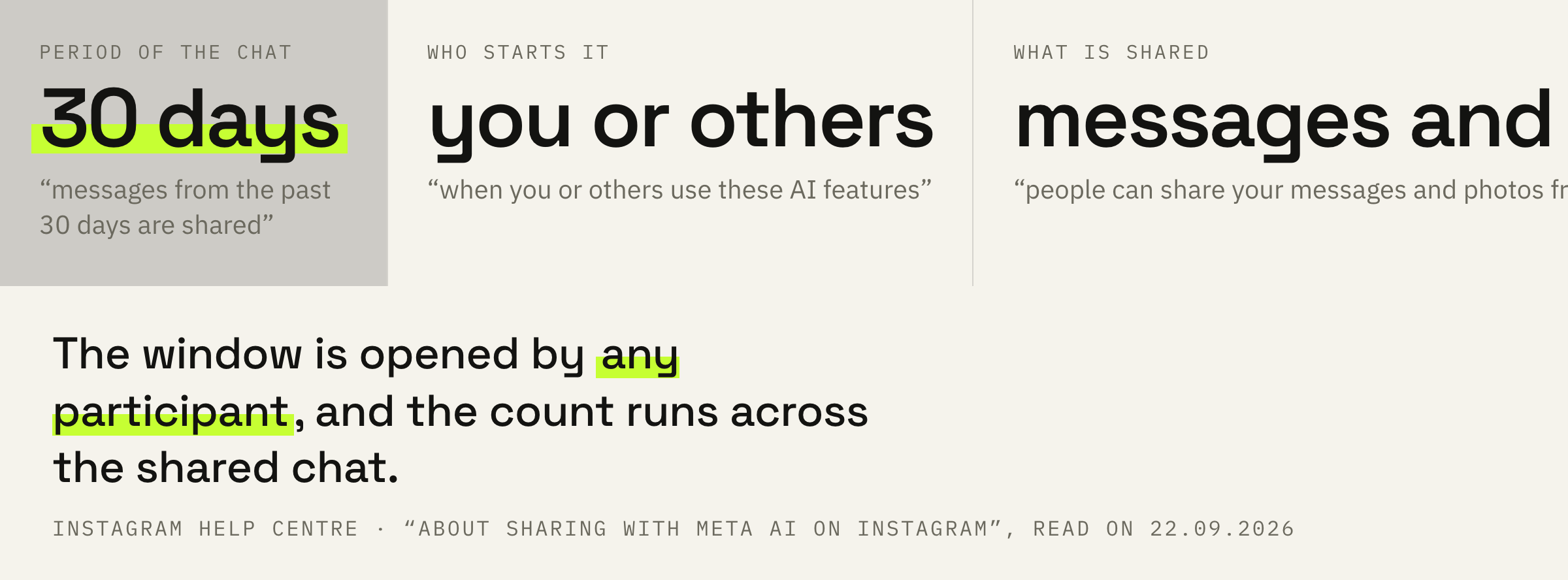
When you or others use these AI features for messages or content in your chats, messages from the past 30 days are shared. This means people can share your messages and photos from chats with Meta AI.
Instagram Help Centre · “About sharing with Meta AI on Instagram”
It is worth pausing on the word “use”. This means an AI feature inside an ordinary chat: a summary of unread messages, rewriting a message, editing a photo. A separate conversation with the bot is not required.
And the period is named outright: the last thirty days of the conversation as a whole. It does not stop at the single message the feature was applied to.
Access is opened by others too
The key line on this page.
The second half of the same quote changes the whole picture: “people can share your messages and photos from chats with Meta AI”.
So the decision is made by any participant of the conversation. The other person taps “summarise chat” or asks the AI to rewrite a reply, the mechanic starts on their side, and the period is counted across the shared conversation.
A client conversation in DMs is a working document: terms, sums, deadlines, sometimes access. And the question here is not about your settings: the feature can be used by the other side.
That is exactly why DMs are worth treating as an open channel. Whatever must stay between you lives elsewhere, while public spaces and private conversation are different kinds of room altogether.
Passwords and finances: a direct warning
The platform itself names what not to write.
Next the Help Centre moves to a direct warning, and its wording is unusually concrete.
Because others in your chats can share your messages and photos with Meta AI to use AI features, be mindful before sharing sensitive information in chats that you do not want AIs to use, such as passwords, financial information or other sensitive information.
Instagram Help Centre · the same page
The platform rarely writes “be mindful before sharing”. Here it did, and it named two examples: passwords and financial information.
For an agency and for anyone who runs clients through DMs this turns into a working rule. Account access, bank details and sums travel by something other than a message in the chat.
DMs are fine for conversation and for agreements. Access is handed over through a password change on the client's side or an invitation to the account. Sums and bank details live in documents and invoices.
We will look at how your client conversations are set up and suggest what to move out of DMs and where.
Responses may be inaccurate
A caveat the platform makes itself.
There is also a line on the page about the quality of responses.
An AI's response may be inaccurate or inappropriate and should not be used to make important decisions.
Instagram Help Centre · the same page
This was written not by a critic of the technology but by its owner. And it reads literally: a summary of unread messages can distort the meaning, and a suggested reply to a client can land badly.
Hence the practice: a reply put together by AI is read with your own eyes before it is sent. The same principle works in texts meant for publishing, where the machine gives a draft and the person puts in the meaning.
One more caveat from the page: AI features are being introduced gradually and are not available to everyone yet. So your set of features and the other person's may differ.
Four levers instead of a switch
What the Help Centre offers in place of an off button.
Now the main question people come here with: how to turn this off.
If you don't want others to share certain messages with Meta AI, you can delete the chat or delete the messages in the chat. You can also edit a message or delete information from the chat.
Instagram Help Centre · the same page
The section the platform keeps for chat control lists four actions: remove a message, delete a chat, unsend a message, edit or remove information from the chat. There is no general off switch in that list.
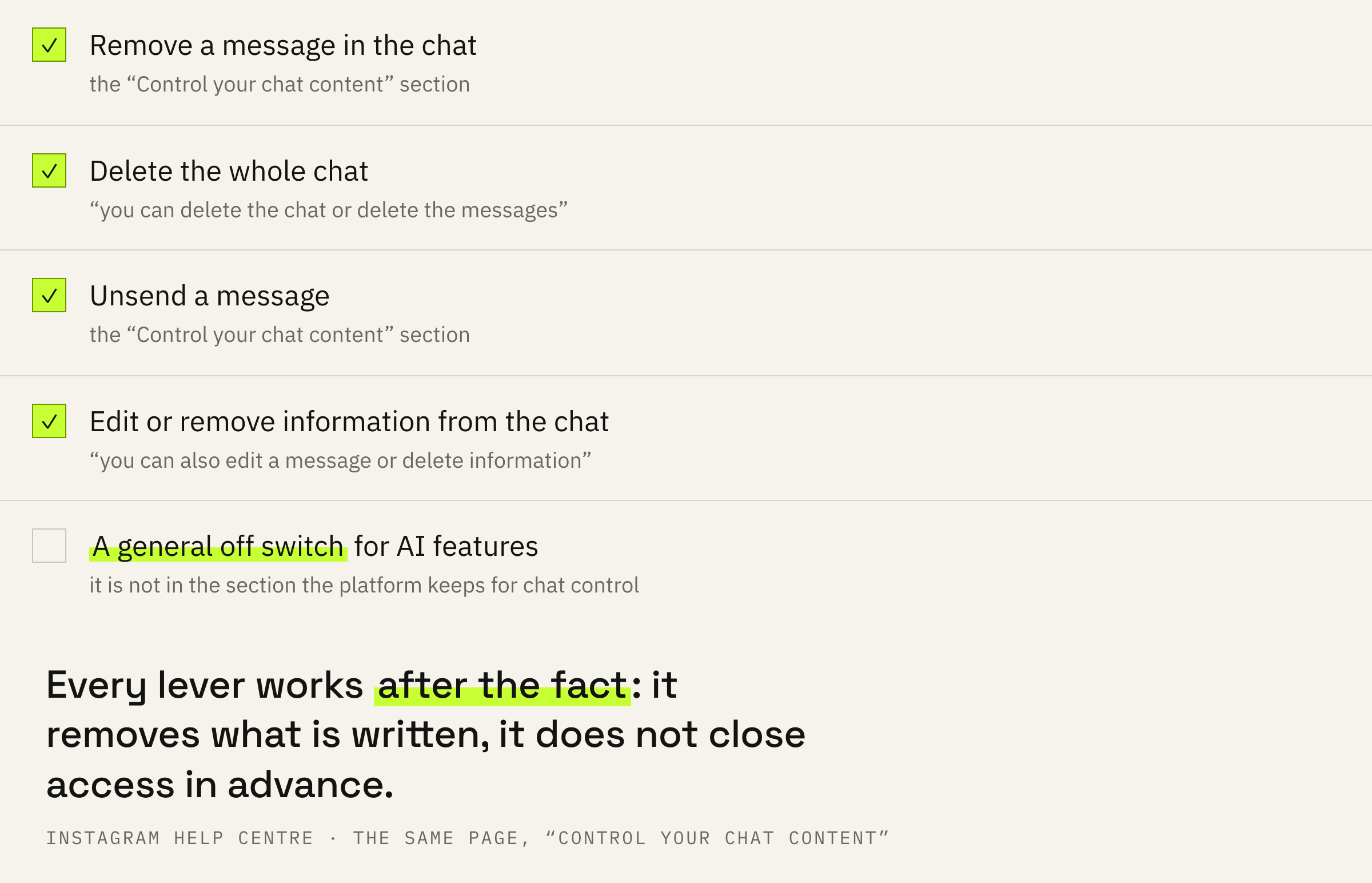
This is worth putting precisely. On the page the platform keeps about chat control there is no off switch. Claiming more than that is not possible, and this article claims no more.
The practical conclusion is unpleasant but honest: control here works after the fact. You remove what has already been written; these levers cannot close access in advance.
Order of work and three mistakes
What to change in your messaging today.
First: treat DMs as an open channel. Access and bank details travel another way.
Second: duplicate important agreements somewhere they will stay: a document, an invoice or a task.
Third: reread AI-assembled replies before sending. The platform itself asks you not to make important decisions by them.
Fourth: remember the period. The last thirty days of the conversation are the window that opens the moment a feature is used, and deleting after the fact works here as it does everywhere: late and partially.