You deleted a post: 30 days, 24 hours and 90 days
Deleted content moves to Recently deleted and stays 30 days, stories get a day, conversations never come back. And full deletion takes up to 90 days.
- Social media & AI
- Mechanics explained
- ≈ 8 min
A deleted post doesn't vanish outright: it moves to Recently deleted and lies there for 30 days. Stories get a day, messages get nothing, and full deletion takes the platform up to 90 days. All four periods are named in the Help Centre.
Four periods: 30 days to restore, 24 hours for stories, up to 90 days for deletion and backup storage after that. Where the bin lives and what never reaches it. Why deleting a weak post doesn't bring reach back. Eight minutes of reading.
30 days in Recently deleted
It leaves your account at once, the system much later.
The first thing to know: the Delete button moves the material rather than erasing it.
Content that you choose to delete is removed from your account immediately and moved to Recently deleted.
Instagram Help Centre · “What happens to content you delete on Instagram”
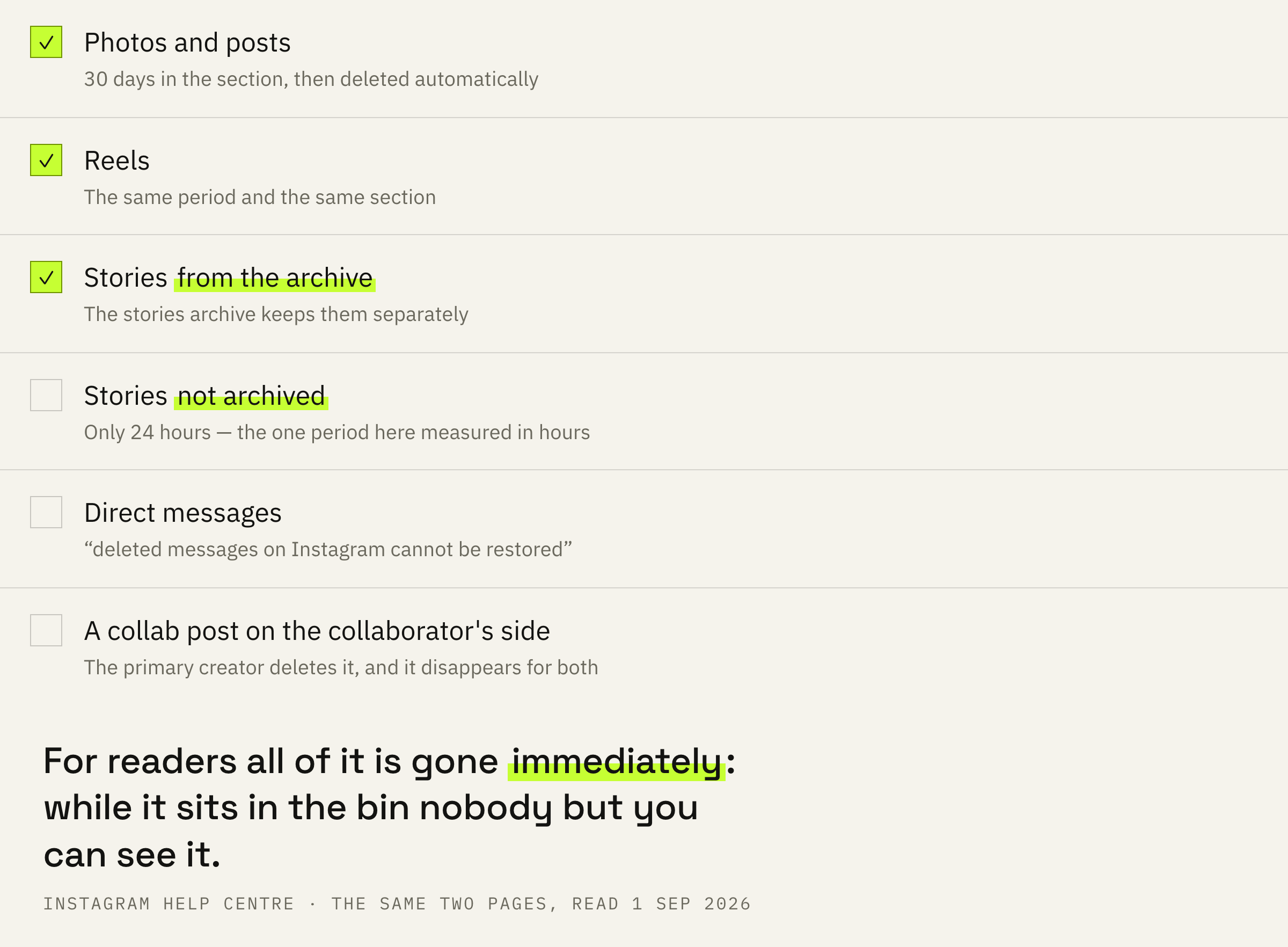
For readers the post disappears the same second: the Help Centre notes separately that the content is not accessible to other people using Instagram. For you it stays available, and there is a period for bringing it back.
Content in Recently deleted will be automatically deleted 30 days later, or up to 24 hours for stories that aren't in your stories archive.
Instagram Help Centre · “How to recover deleted Instagram photos, videos, reels, and stories”
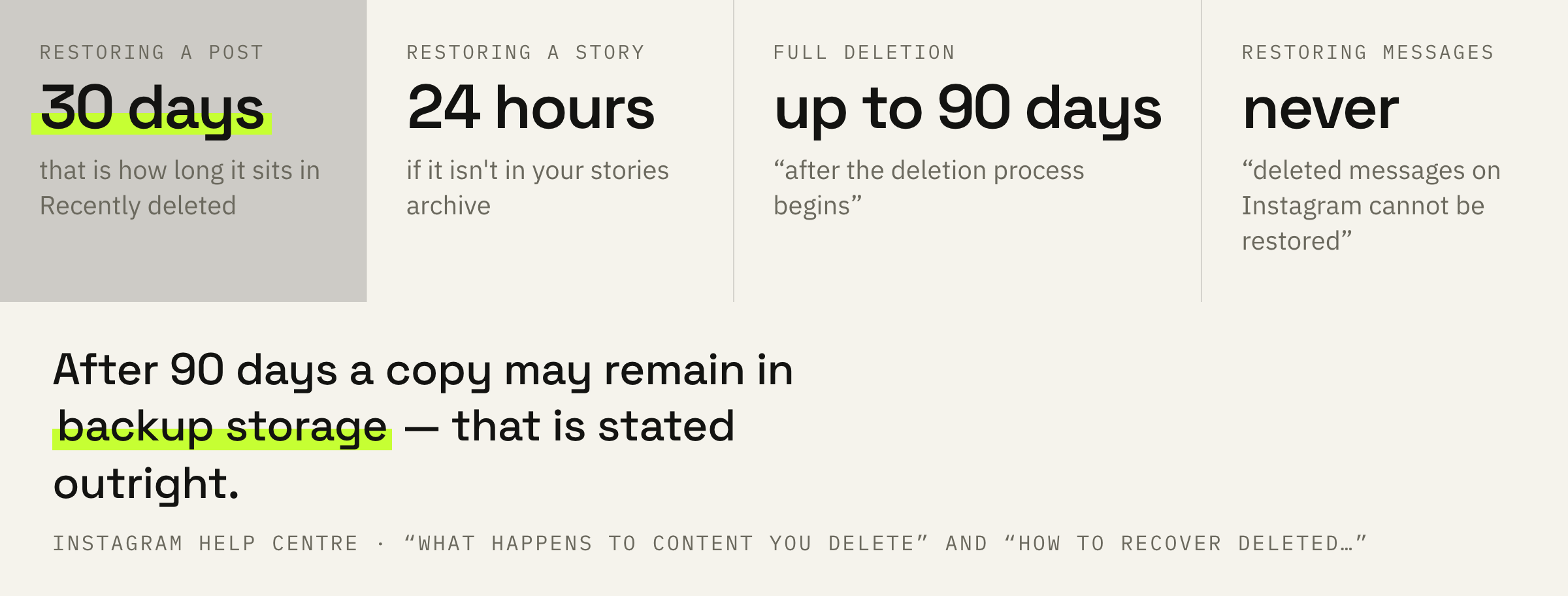
The gap between thirty days and one turns out to be the most practical detail in the whole topic. A deleted post can be restored for a month, a deleted story that isn't in your archive only for a day.
Profile → “Menu” in the top right → the “How you use Instagram” section → “Your activity” → “Deleted and archived content” → “Recently deleted”. The type is chosen at the top: posts, videos or stories.
If the material isn't in that section, more than 30 days have passed since deletion, and for a story more than 24 hours.
Up to 90 days and backup storage
Full deletion takes longer than it seems.
Thirty days is how long you keep access to the bin, and the period of actual deletion is a different one entirely.
It may take up to 90 days to complete the deletion process after it begins. Copies of your content may remain after the 90 days in backup storage that we use to recover in the event of a disaster, software error, or other data loss event.
Instagram Help Centre · “What happens to content you delete on Instagram”
Read this calmly: it is about the engineering side rather than about distribution. A post will not come back into anybody's feed out of a backup. But if you are deleting material so that none of it remains anywhere, the honest answer is that it doesn't work that way.
If the deletion is tied to a client complaint, to music rights or to somebody else's face in the frame, the date it leaves your account and the date of actual deletion are different dates. The first arrives at once, the second can take up to 90 days.
Messages and somebody else's copy
Two boundaries with no way back.
The first boundary is named in one short line.
Keep in mind that deleted messages on Instagram cannot be restored.
Instagram Help Centre · “How to recover deleted Instagram photos, videos, reels, and stories”
Conversations never reach the bin at all. It is noted separately that messages you have unsent won't be included in the export of your information from Instagram either.
The second boundary is collaborative posts. Only the primary creator can delete them, and the material disappears from the collaborator's profile along with the original. The other side has no undo button.
What deleting doesn't fix
The most expensive mistake around this button.
A popular tactic: reach dropped, so the failed post must be deleted and things will straighten out. The documents say otherwise.
Eligibility for recommendations is switched off at the account level: “none of your content will be recommended”, and it makes no difference whether all of your content goes against the Guidelines or only part of it. That is checked on the “Account Status” screen, not by deleting posts one at a time.
A practical conclusion follows. Deleting makes sense when a specific post is shown to you as offending: then you are removing the cause. In every other case you are simply losing the material and its insights.
The numbers. A post's insights live together with it, and formats can only be compared inside 90 days. By deleting a post you cross a row out of your own table of observations — and the next conclusion will have to be drawn from less material.
We'll look at the account before you press “Delete” and tell you what to remove, what to archive and what not to touch.
The order of actions
Four steps before you press Delete.
First: save the file for yourself. The post goes to the bin for 30 days, but the source file should stay with you in any case.
Second: write the numbers down. Insights disappear along with the post, and they may come in handy when comparing formats.
Third: if it is a story and it isn't in your stories archive, remember the day. That is the only period in this topic measured in hours.
Fourth: consider the archive instead of deleting. The post leaves your profile, stays with you and the ninety-day deletion process never starts at all.
A week after deleting, open Recently deleted and see whether you want it back. If you do, you deleted in haste, and next time it is worth starting with the archive.
What not to do
Three mistakes around one button.
The fourth mistake concerns stories. They get deleted easily, because they disappear in a day anyway. But if a story isn't in your archive, the window to restore it is that same day, and the day after it is already gone.