Shadowban on Threads: what triggers it and how to get out
Shadowban on Threads: the post stays in place but never enters the set the feed picks from. Four screens to check, the list of causes from the platform's own rules, and a two-week order of actions.
- Threads
- Problem breakdown
- ≈ 14 minutes
The posts are still there, they open by direct link, they sit in your profile — and the view count is ten times lower than usual. Below we go through what is actually happening inside the feed, which screens show it, and what the platform really restricts accounts for.
Four screens inside Threads that show what happened. The list of causes the platform publishes itself. A two-week order of actions. Fourteen-minute read.
The platform has no term “shadowban”. The mechanic exists
The word appears nowhere in the help centre. What people call by it is described elsewhere.
“Shadowban” is a readers' word, not Meta's. It appears neither in the Community Standards nor in the Threads help centre. What does exist is a document that describes what is going on in more detail than the entire market's guesswork put together.
Meta publishes system cards: a separate page for each feed explaining how what you see gets picked out of everything written. The Threads feed has one, last updated 7 March 2025.
Its very first paragraph explains the main thing. The feed collects all material from accounts a person follows, and only part of the public content on Threads. Then comes the clause that makes reading primary sources worth it: the set takes in posts “that follow our quality and integrity rules”.
The post is not deleted. It opens by direct link and sits in your profile. It simply did not make it into the candidate set the feed picks from when deciding what to show people who don't follow you.
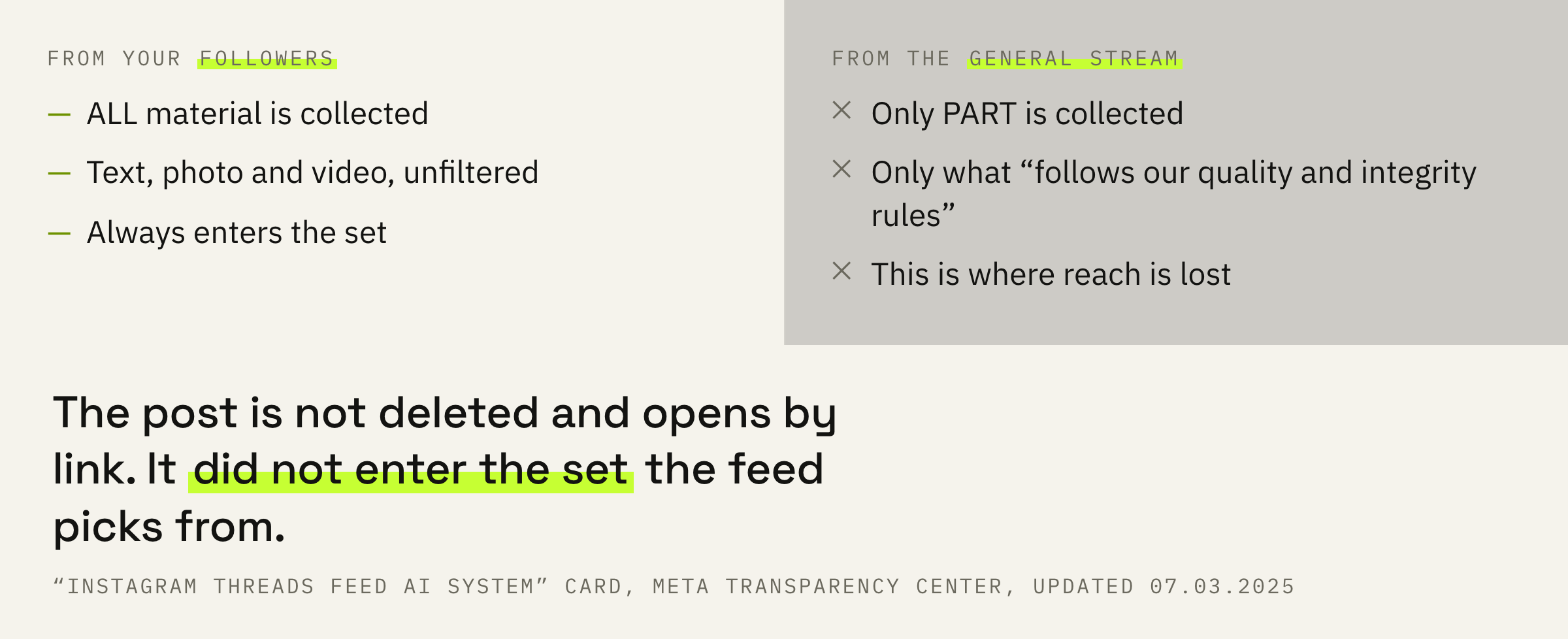
Which gives the first checkable sign. The drop hits non-followers earlier and harder than followers: your followers' posts are collected without filtering, the general stream is filtered on the way in.
The second sign is in the same place. In the Threads feed, follows and recommendations run mixed together, and the platform says so plainly: the system “shows you recommended content and material from accounts you follow at the same time”. Your post competes not only with other authors the person follows, but with everything the feed decided to recommend them.
A follows-only feed does exist on Threads, but you turn it on by hand: tap the Threads logo on the home screen and pick the “Following” list. No recommended content appears there. By default a person never sees that feed.
Two bars: staying up and being recommended
Different documents, different thresholds, different consequences.
The Community Standards answer one question: will the post stay up at all. The recommendation guidelines answer another: will it be shown to people who don't follow you. Two documents with two different thresholds, and confusing them is expensive.
Since 12 November 2024 the Community Standards have been merged into one set covering Facebook, Instagram, Messenger and Threads at once. The recommendation rules are documented in most detail on the Instagram side, and the wording there leaves no room: standards for content from accounts a person doesn't follow “should be stricter”, and the guidelines themselves are built to a “higher standard than the Community Standards”.
Removal has to be loud: something you wrote is being taken away from you. Being refused a recommendation takes nothing away — nobody ever promised you somebody else's audience. Hence the feeling that it all happens behind your back.
That exact difference explains why third-party “shadowban checkers” show nothing. They check whether the post opens, and it always opens. What is broken is distribution, and from the outside distribution is invisible.
What to open before you diagnose anything
Three screens inside Threads and one question to yourself. Five minutes.
The first screen is “Account Status” — the only one where the cause is named by the platform itself, not by your guesses.
“Menu” in the bottom left, then “Settings”, then “Account status” — that is how the help centre describes the path. Inside there are two sections — “Removed content” and “Features you can't use” — plus a “Request a review” button.
On Instagram this same section also answers the recommendation question: whether your content qualifies, which posts are in the way, which rule was broken. The Threads help centre has no such line — only removed content and blocked features. Threads gives no direct answer to “have I dropped out of recommendations”, so from here the diagnosis has to be assembled from numbers.
The second screen is insights: on a computer they open from threads.com, the “Insights” item in the left menu. What's in them, what isn't, and how to read each number is in the separate breakdown of Threads insights; here they're needed for one comparison.
And here the news is good. For an individual post, Threads now shows views from followers and from non-followers as two numbers, and the “Audience” tab in the summary splits viewers themselves into your own and strangers. As recently as summer 2026 this didn't exist, and the diagnosis was assembled indirectly. Now it's enough to compare two numbers on your recent posts: if it's “Non-followers” that dropped, you've stopped being shown to strangers.
Against your own posts. The last ten against the ten before: same format, same time of day, same length. A drop of several times against your own baseline is a reason to look further. A small difference between neighbouring weeks is always there, and some metrics the platform itself marks as estimated.
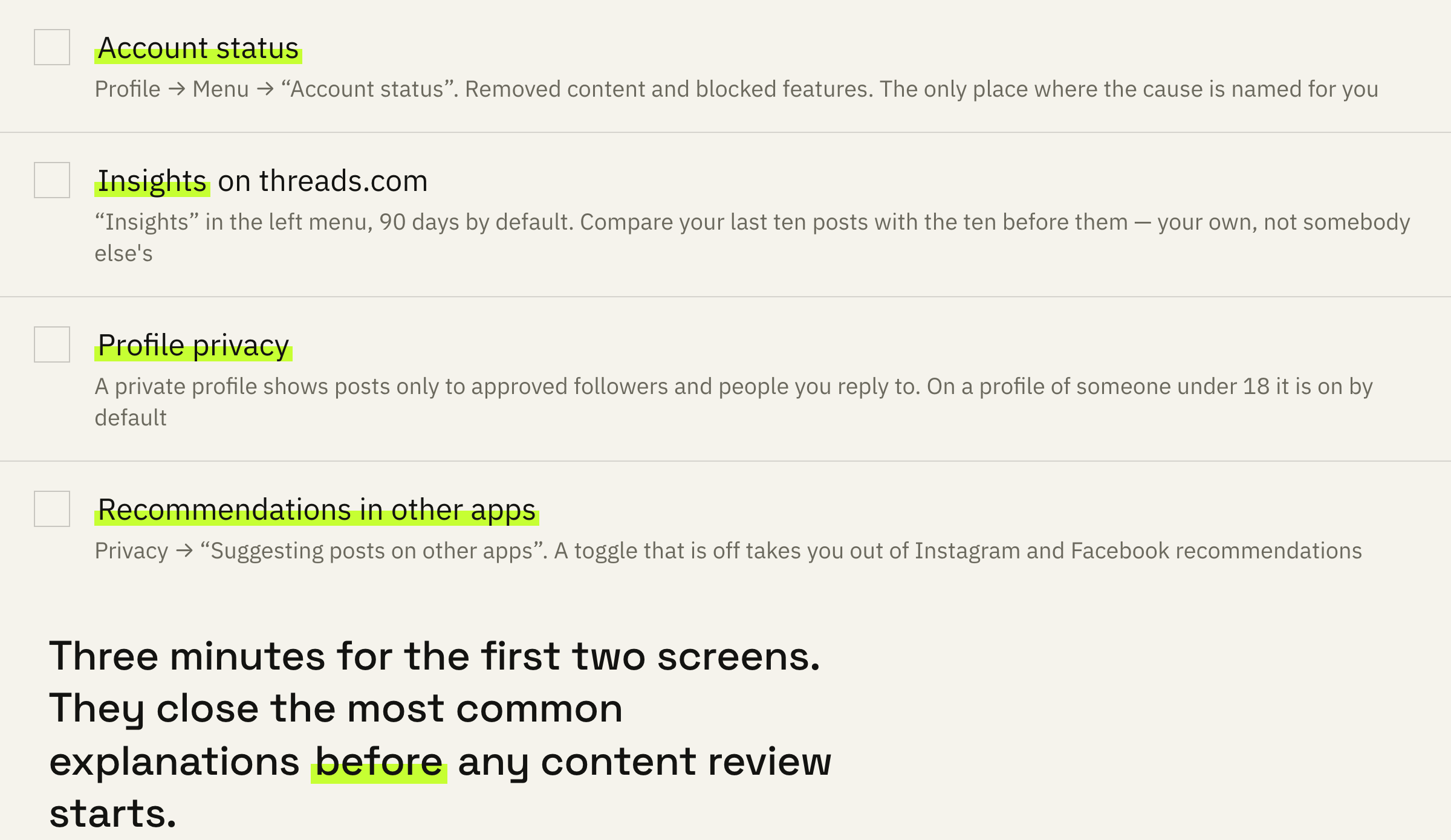
The third screen is your profile privacy settings. A private Threads profile means only approved followers and people you reply to see your posts. It also removes almost everything that creates distribution: nobody can share your threads to Instagram or Facebook stories, and nobody can embed them on outside sites.
A Threads profile created by someone under 18 is private by default. That is the first version to check if the account was set up by someone other than the person running it now.
The fourth item is no longer a screen. It is a question to yourself: what changed in the week things dropped. A new topic, a new post template, a new link, a sharp jump in frequency, followers bought “for a boost”. Answering it will save you two weeks of checking later.
The setting people mistake for a ban
One toggle that takes you out of recommendations in the neighbouring apps.
Threads has a switch that controls whether your posts appear in Instagram and Facebook recommendations. To find it: “Profile”, then “Menu”, then “Privacy”, then “Suggesting posts on other apps”. There are two toggles: Instagram and Facebook.
A toggle that is off means your threads will not appear in the neighbouring apps' recommendations. That is not a platform restriction but your own setting, and checking it takes twenty seconds.
Even with both toggles off, people can still share your posts — through reposts, links, stories and messages. The platform notes this separately: the toggle closes recommendations, it does not touch links and reposts.
If reach has dropped and “Account status” is clean, we'll look at your profile and tell you exactly where the distribution is being lost.
What it actually happens for
The platform's list, not a list of guesses.
The spam rule lives in the Community Standards, and it has two halves. The first is known to everyone: you may not post, share or engage “manually or automatically at very high frequencies”. The second half usually goes unread. That is the one that does the work.
We may place restrictions on accounts that are acting at lower frequencies when other indicators of spam (e.g. posting repetitive content) or signals of inauthenticity are present.
Meta Community Standards, “Spam” section
What gets restricted is not the number of posts by itself. What gets restricted is repetition: the same text, the same call to action, the same link under every post.
We copied the same call-to-action line under every post — it was faster. It hit us several times. The cure turned out to be free: change the wording every time, even if only one word changes.
What that call to action should look like and where it should lead is in the breakdown of moving people from Threads to Telegram.
The same spam rules list separately a “request or requirement for users to engage with content before they are able to view or interact with it”. The market calls this “a like for access” and “comment below and I'll send the file”. The rules spell it out in plain words.
The recommendation guidelines add their own list. It is written on the Instagram side, but the standards are shared across the platforms, and the wording is useful here word for word.
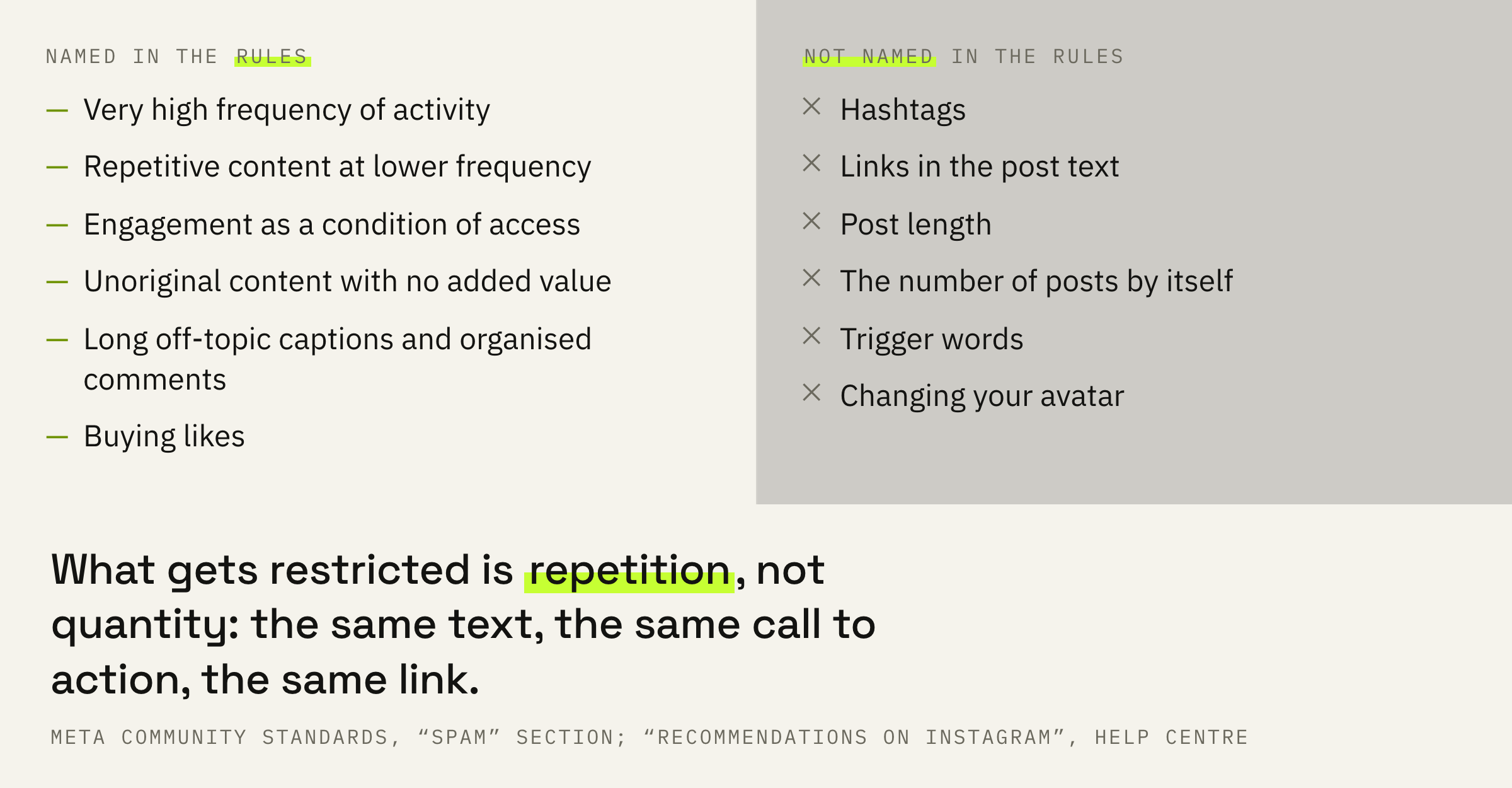
Look at what is not on that list. Posting frequency by itself is not there, nor hashtags, nor links in the text, nor post length. Nor are they in the ten predictions the platform lists for the Threads feed: those are likes, replies, taps on the post, taps on the author's profile and time spent.
One of the ten predictions is the probability that a reader “will scroll past the post rather than engage with it”. The system counts scrolling past just as carefully as it counts a like, only with the opposite sign.
What to do for two weeks
One change at a time, or there will be no answer.
First: “Account status”. If something was removed, tap “Request a review” and take down whatever repeats the cause. If features are blocked, the same screen says which ones and what to do about them.
Second: break up the repetition. The same call to action, the same link, the same post skeleton. That is the first thing to vary in wording. It is word for word the indicator the spam rules place next to frequency.
Third: go back to your previous posting rhythm. The platform names no posts-per-day figure anywhere, so we won't name one either. But a sharp jump in frequency is the first half of the spam rule, and checking it is cheaper than guessing.
Fourth: work the first hour. The windows the system counts signals over are named in the card outright: the last 15 minutes, the last hour, the last 6 hours, day, week, month. Replies to comments in the first hour land in the shortest of them.
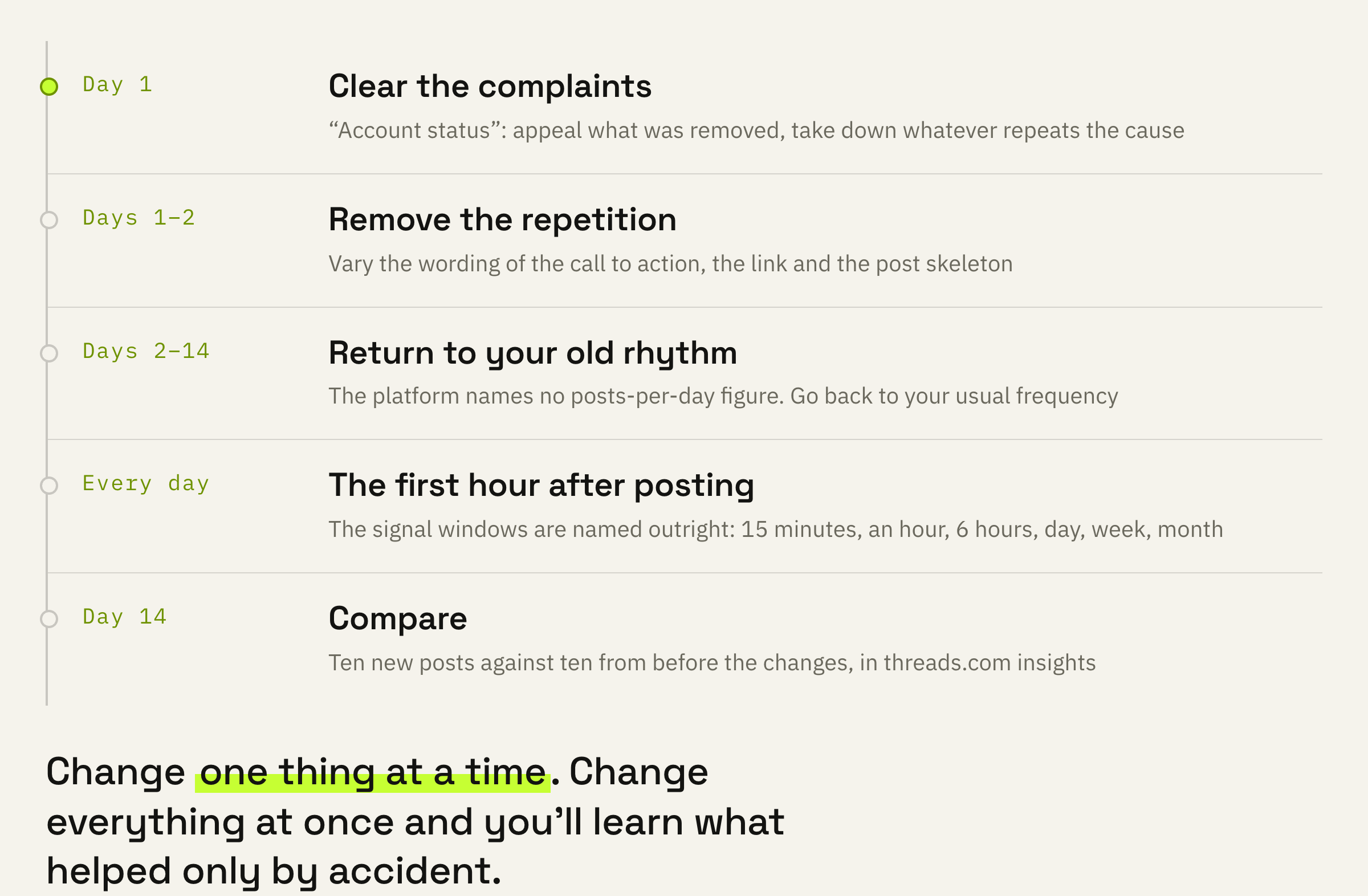
After two weeks open your stats and compare ten new posts against ten from before the changes. Changed one thing — you'll see what helped. Changed everything at once — you'll find out only by accident.
And one thing that works both ways. Among the signals for the Threads feed predictions is the ratio of likes to impressions. The absolute number is not there. A post seen by a thousand people with ten replies looks different to the system than a post seen by ten thousand with the same ten.
What not to do
Four reactions, every one of which strengthens the cause.
There is an opposite extreme too — freezing until things are clear. That is worse: the prediction signals include windows over a day, a week and a month, and an empty week lands in them exactly like a bad one.
What to do next
One decision for today.
Open two screens in a row: “Account status” and the “Suggesting posts on other apps” setting. That takes three minutes, and it closes the most common explanations.
If both are clean, the issue is distribution. It gets fixed by what is in the posts, and no complaint will do that work for you. From here on it is ordinary work: what you write, who for, and how often you repeat yourself.
We'll look at your profile and your last thirty posts, tell you where exactly the reach is being lost, and show you what to change first.
If you want reach on Threads to stop being a lottery — leave a request. We'll get in touch if there are slots available at the moment. There is usually a queue and a wait.