Instagram Live: 1,000 followers and 90 days
The Live button appears on two conditions, not one. Scheduling is spelled out by the hour: from 90 days to an hour, reminders and a 45-minute deadline.
- Social media and AI
- Mechanics breakdown
- ≈ 8 minutes
Half of all accounts simply have no Live button, and the explanation offered is anything at all: the settings, the region, the age of the app. The Help Centre holds one sentence with two account conditions and a threshold of 1,000 subscribers. Scheduling a broadcast is set out just as precisely: from 90 days to an hour, reminders a day and a quarter of an hour before, and rescheduling no later than 45 minutes before the start.
The entry threshold and the second condition people forget. Why the button is missing for those who have cleared the threshold. Every scheduling deadline. What is saved from a broadcast and what is lost for good. Eight minutes of reading.
A thousand followers and a public profile
There are two conditions, and the second is lost more often than the first.
The Help Centre answers the main question of the topic in one sentence.
Only Instagram users who have a public account with 1,000 followers or more will be able to start a Live broadcast.
Instagram Help Centre · “Start a live broadcast on Instagram”
There are two conditions here. Everyone remembers the thousand followers and nobody remembers the public account: a private profile with five thousand followers will not go live.
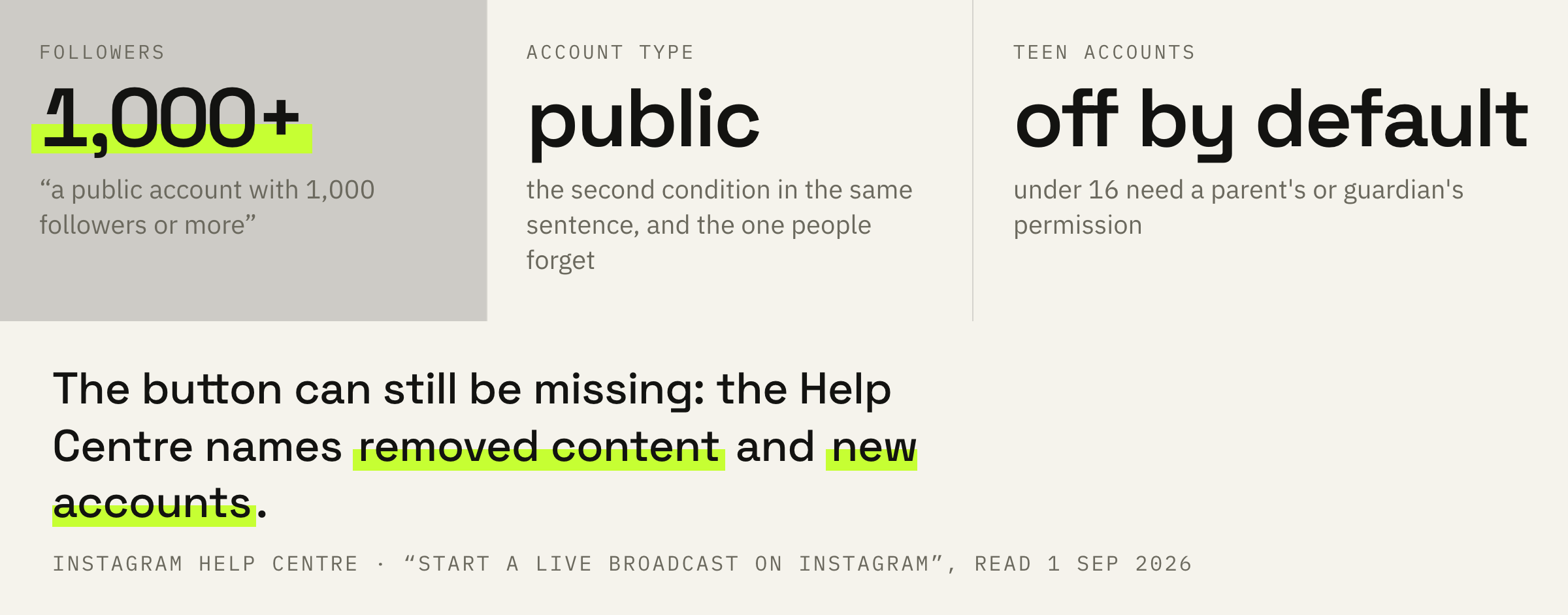
Teen Accounts are covered separately: there the ability is off by default. Anyone under sixteen needs permission from a parent or guardian, while sixteen- and seventeen-year-olds turn the feature on themselves. For private spaces this is familiar logic, and Instagram is built the same way.
The threshold is cleared and the button is missing
The second explanation, absent from every checklist.
Next comes a note worth all the talk about mysterious restrictions.
You may not be able to start a live broadcast on Instagram if you've previously posted something that's been removed for going against our Community Standards. Newly created accounts may not be able to go Live or co-broadcast.
Instagram Help Centre · the same page
Two causes are named outright. The first is content removed earlier. The second is a newly created account, and here the platform names neither a time frame nor a number of days.
Guessing at this makes no sense: Instagram has a separate screen showing the restrictions on an account. The breakdown of “Account Status” we did separately, and the logic is the same: look at the screen first, build theories afterwards.
A broadcast from a new account cannot go into the content plan as a fixed item: the feature may be unavailable, and the platform names no waiting period. At launch it is safer to keep a spare format.
We'll look at the account and tell you when a live will appear in your plan and what to schedule instead until then.
From one hour to 90 days
The scheduling window is named at both ends.
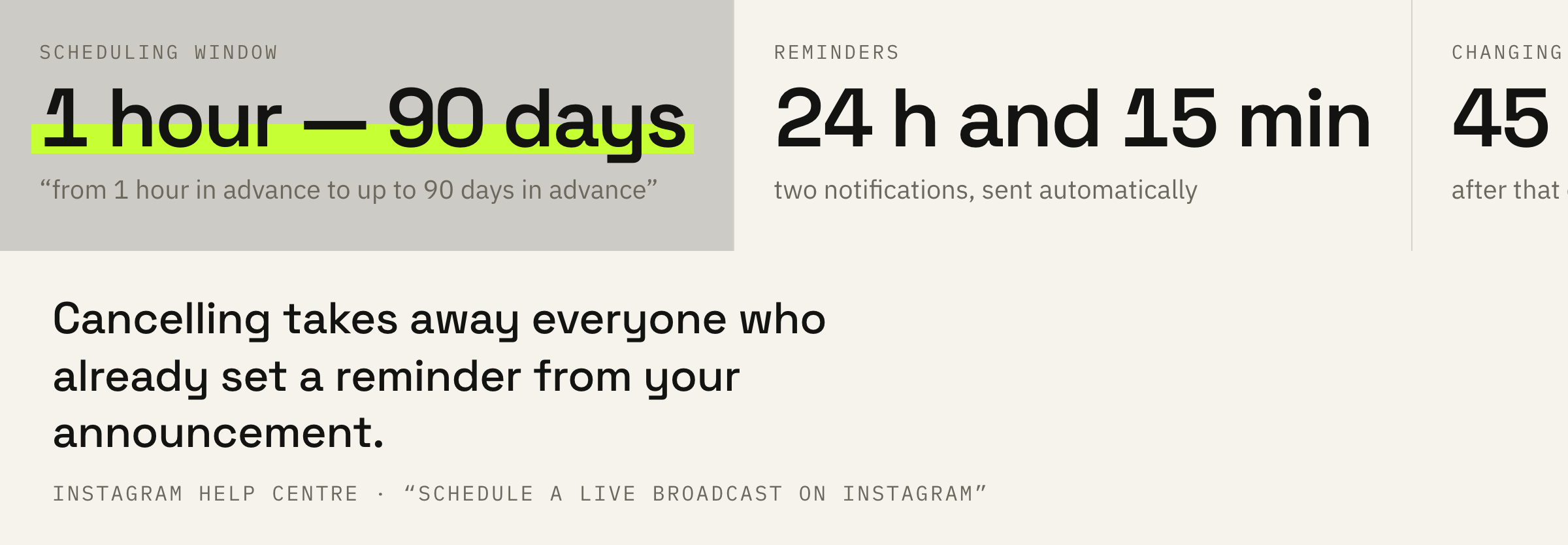
You can schedule a live broadcast anywhere from 1 hour in advance to up to 90 days in advance to connect with your followers.
Instagram Help Centre · “Schedule a live broadcast on Instagram”
The upper bound here is more interesting than the lower one. Ninety days means a broadcast goes into the plan a quarter ahead, alongside a product launch or an intake for a course.
The announcement of a scheduled broadcast is published separately, in stories or in the feed, and it shows the title and the start time. A viewer sets a reminder, and from there the platform does the reminding itself.
Reminders and rescheduling
Two deadlines that decide the fate of the announcement.
You'll receive a notification reminding you about your scheduled live broadcast 24 hours and 15 mins before the time you selected.
Instagram Help Centre · the same page
The notifications arrive twice. That is a ready-made frame for the announcement: a day to prepare and a quarter of an hour to check the connection.
You can change the start time of your live broadcast up until 45 minutes before it's scheduled to start.
Instagram Help Centre · the same page
Forty-five minutes is a hard bound. Rescheduling a broadcast half an hour before the start will not work; all that is left is to cancel it and set a new one, losing everyone who has already put in a reminder.
Schedule the broadcast at least a day ahead so the first reminder has time to fire. Share the announcement right after scheduling. Take the decision to reschedule the start time before the 45-minute mark rather than at the last moment.
The video is saved, the rest is lost
This matters to anyone planning to use a broadcast a second time.
A finished broadcast can be posted to the profile or downloaded from Live Archive. But not everything is saved.
Keep in mind that when you save your live broadcast to your profile or download the broadcast from Live Archive, only the broadcast is saved, and not things like comments, likes and viewers.
Instagram Help Centre · “Start a live broadcast on Instagram”
Comments live only while the broadcast is on. If the conversation with viewers is the main value in it, that conversation has to be taken during the broadcast rather than after.
There is a working detail about moderation too: any keyword filters you have turned on for comments also apply to comments on a live broadcast. The breakdown of Hidden Words explains how that filter is built.
Comments during a broadcast can be turned off entirely, as can requests to join. Both toggles sit in the settings while the broadcast is running.
The preparation routine and three mistakes
Five points before you press the button.
First: check both entry conditions. A thousand followers and a public profile.
Second: if the button is missing while both conditions are met, open “Account Status” and look at the restrictions rather than hunting for the cause in the settings.
Third: schedule the broadcast at least a day ahead. The first reminder arrives exactly 24 hours before.
Fourth: keep the decision to reschedule the start time ahead of the 45-minute mark.
Fifth: decide in advance what to do with the recording. It goes to the profile or is published as a reel, while comments and viewer data will not be saved.