How to delete Threads without deleting Instagram: 30 and 90 days
Deleting Threads leaves Instagram alone, but the same account can only sign up again after 90 days. The reversible door is deactivation, once a week.
- Threads
- How it works
- ≈ 8 minutes
There is one fear around this button: I delete Threads and lose Instagram. The Help Centre answers it outright, and the answer is calming. The second line on the same page is less cheerful: getting back into Threads with the same Instagram account will only work after 90 days. The door that opens both ways is called deactivation, and it works once a week.
What happens to Instagram when Threads is deleted. How long to wait if you change your mind. What goes on with the profile during the first 30 days after the request. How deactivation differs from deletion and why it has a limit of its own. How to choose between the three doors. Eight minutes of reading.
Instagram stays where it is
The Help Centre answers the main fear in a note of its own.
Start with the thing this page gets opened for.
Note: Deleting your Threads account won’t also delete your Instagram or Facebook account.
Instagram Help Centre · ‘Deleting your Threads account’
It is put in a separate note, and that is no accident: this is the question asked most often. The profile, the posts, the followers and the direct messages in Instagram stay untouched.
The confusion grows out of how the two apps are tied together. Signing in to Threads goes through an Instagram account, and from the outside it looks like one record shared by two apps. Inside Meta the link is arranged less simply, and a profile, an account and the Accounts Centre are three different things.
The reverse is also true and deserves a mention of its own: deleting the Instagram account takes Threads with it, because Threads rests on it. The door only swings one way.
Ninety days with no return ticket
The real price of the decision is hidden in the next line.
Calmed down by the first note, people usually close the page. They should not: the price of the decision is named below.
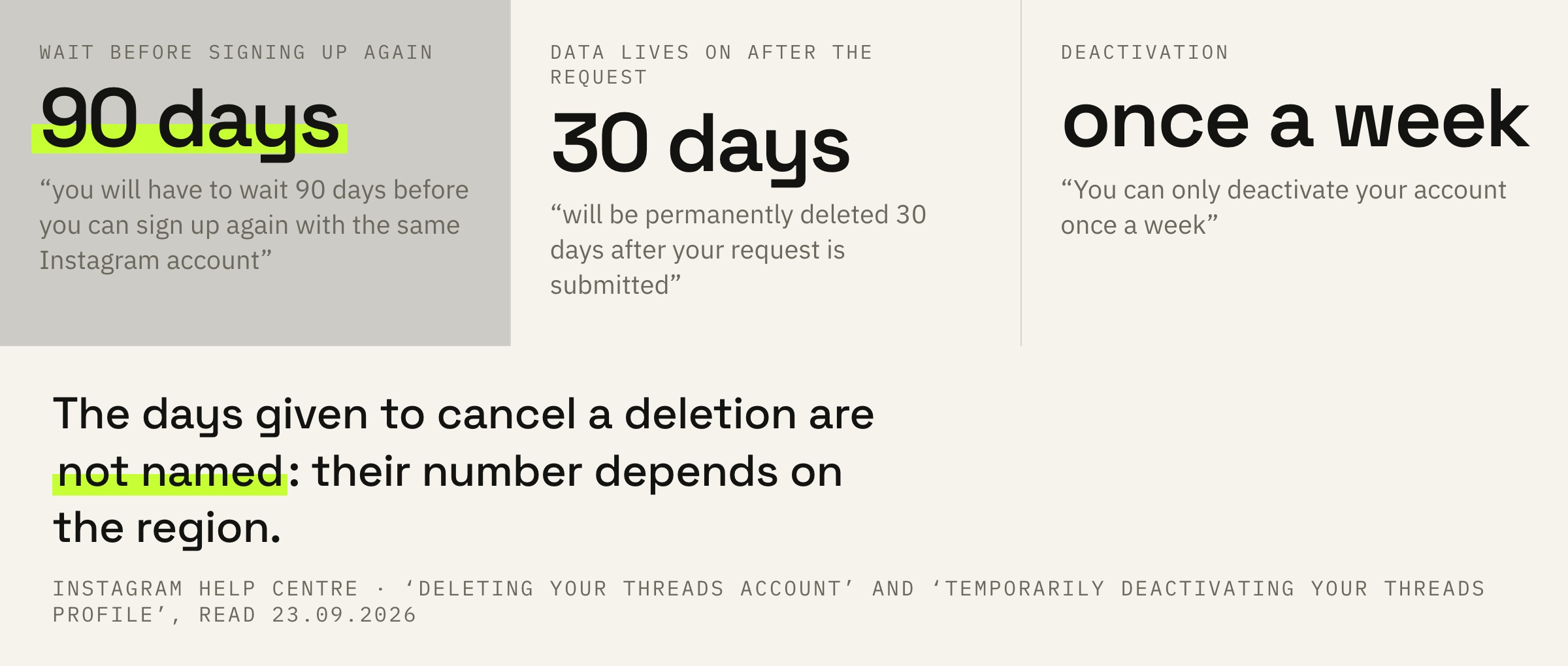
After your Threads account is deleted, you will have to wait 90 days before you can sign up again with the same Instagram account.
Instagram Help Centre · the same page
Read that literally. The Instagram account stays yours, but as a key to Threads it stops working for 90 days. Setting the profile up again the same evening, having changed your mind, is not going to happen.
For a personal account that is an annoyance. For a working one it is three months without a platform where you may already have gathered an audience.
Hence a simple rule: the decision to delete is not made on the day the platform disappointed you. If the matter is a drop in reach, that is what needs sorting out, and restrictions in Threads are visible on a screen of their own and are lifted differently.
Thirty days while it is all still there
The request is sent, but the profile still exists.
Between pressing the button and the data disappearing lies a month, and it is arranged curiously.
Your profile, content, likes and followers will be permanently deleted 30 days after your request is submitted, and you’ll no longer be able to retrieve your information. During the 30-day period, the content of your profile remains subject to Threads' Terms of Use and Supplemental Privacy Policy and is not visible to other people using Threads.
Instagram Help Centre · the same page
Three things in one line. The data lives on for another 30 days after the request. The rules of the platform keep applying to it all that time. And for everyone else the profile is already invisible.
From the outside you disappeared at once, while inside the system you are still on the books. That is exactly why a window for cancelling exists at all.
Note: The number of days that you can cancel an account deletion varies by region.
Instagram Help Centre · the same place
The Help Centre gives no number of its own here, and that is more honest than it looks. Any specific figure in somebody else’s retelling was not taken from here: the platform says only that the period depends on the region.
Counting on the cancellation as a part of the plan is not worth it. Its period is not named, and after 30 days the profile, the posts, the likes and the followers are deleted for good. Plan from that date, not from the cancellation window.
Deactivation and the once-a-week limit
The reversible door that people do not know about.
The exit from Threads has a second option, and it is rarely looked for, because it lies on another Help Centre page.
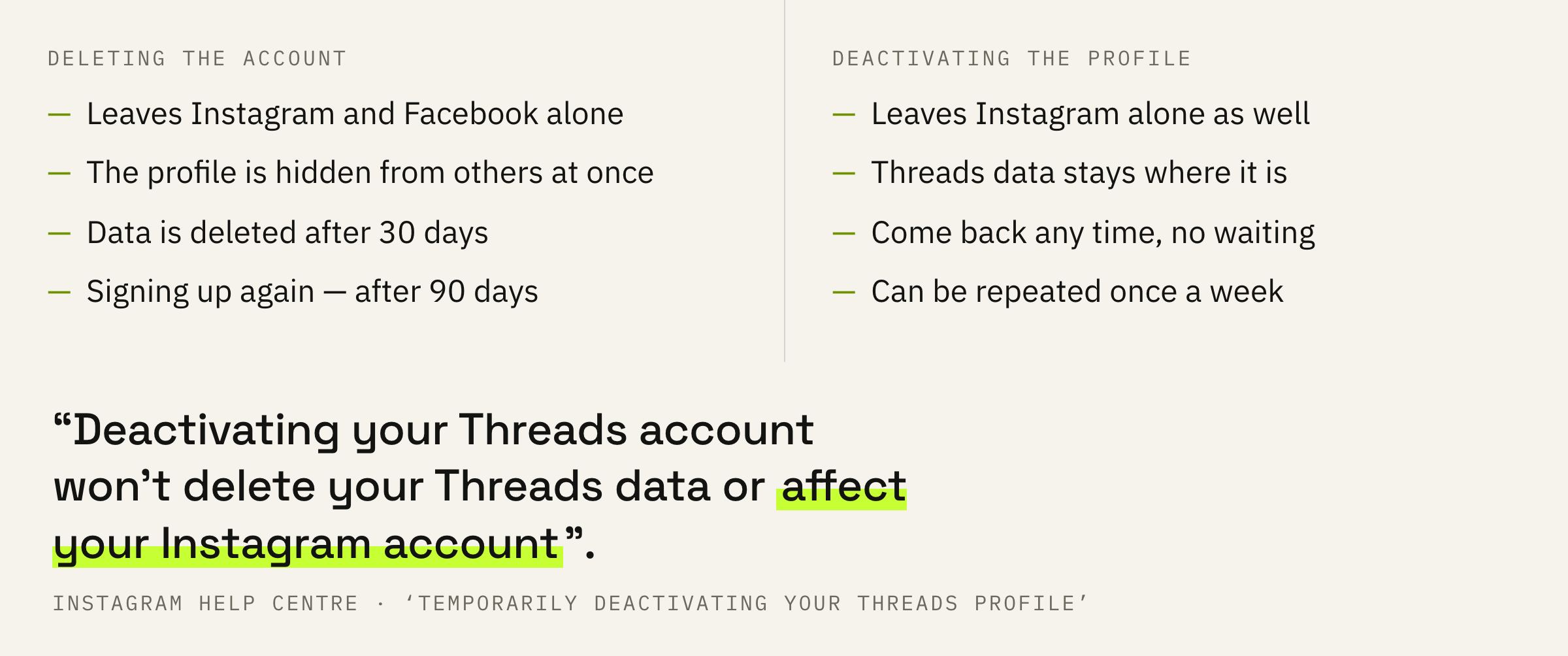
If you’ve created a Threads account with your Instagram or Facebook account, deactivating your Threads account won’t delete your Threads data or affect your Instagram account.
Instagram Help Centre · ‘Temporarily deactivating your Threads profile’
Deactivation hides the profile and leaves the data in place. There is no waiting period of 90 days here and no permanent deletion after a month: you come back and everything is where it was.
It has a limit of its own, and an unexpected one.
You can only deactivate your account once a week.
Instagram Help Centre · the same place
So using deactivation as a switch for the weekend will not work. Switched off on Friday, switched on on Saturday, and the next time is a week away.
One more detail for those who publish to the Fediverse: after reactivation, posting there only becomes available 30 days from the moment of deactivation.
Which door is yours
Three scenarios, and in two of them there is nothing to delete.
Let us boil it down to a choice. The reason for leaving is usually one of three, and each has its own door.
The first reason is being tired and wanting quiet. Deactivation closes that question entirely: the profile is hidden, the data is intact, coming back costs nothing.
The second is the platform giving no result. That is not a reason for the delete button: the Threads feed works by described rules, and more often the matter is the shape of the posts rather than the platform itself. It is also worth checking where your funnel leads at all: selling inside Threads is something the platform does not help with.
The third is leaving for good with no need for the data. Only here is deletion in place, and only here are the 90 days of waiting no loss.
We will look at your threads from the past month, go through the angles and the opening lines, and tell you whether it is the platform or the delivery.
The order of steps and three mistakes
Four steps if the decision has been made anyway.
First: work out what you actually need, a pause or an exit. Which of the two buttons you are looking for depends on that, and their prices differ.
Second: if it is a pause, deactivate the profile and remember the date. This action can be repeated only in a week, and a second attempt on the same day will not go through.
Third: if it is an exit, download what you would miss before pressing the button. After 30 days the profile, the content, the likes and the followers are deleted for good, and the cancellation window has no stated period.
Fourth: do not expect Instagram to feel anything. It stays where it is, and there is nothing to restore there.
Before pressing, answer one question: will you need this data in a year. You will — deactivation, and the decision costs nothing. You will not — deletion, and then the 90 days of waiting do not concern you at all.