Instagram carousel: 20 files and one orientation
Up to 20 photos or videos in one post, one orientation for all of them, and video in a carousel is not Reels and does not reach the Reels tab.
- Social media and AI
- Mechanics explained
- ≈ 8 minutes
Two numbers follow the carousel around the blogs: ten slides and “video from a carousel goes into reels”. The first one is out of date, the second was never true. The Help Centre names twenty files and states in a separate line that video in a carousel is not shown in the Reels tab.
The exact number of files in one post. The single orientation rule and what it means for the shoot. Why video from a carousel does not work as Reels. What can be edited in a published post and what cannot. Eight minutes of reading.
Twenty files, not ten
The number has grown, while the tables in blogs have stayed the same.
Let us start with the number that causes the most confusion.
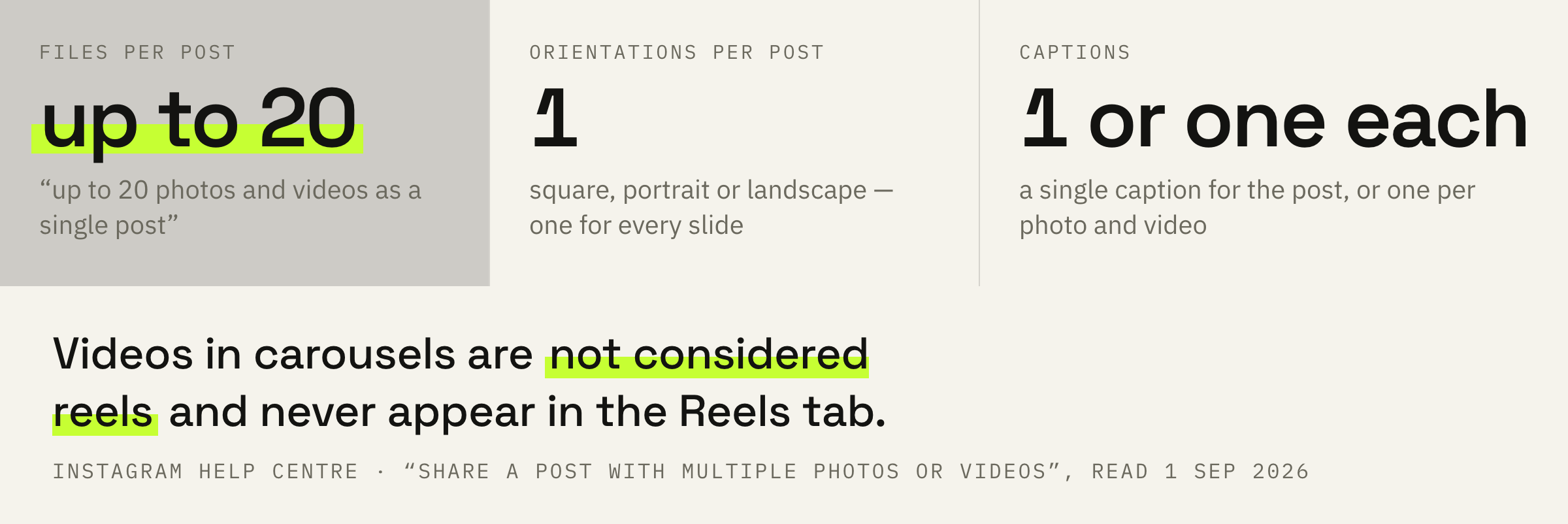
You can share a post with up to 20 photos and videos as a single post, also known as a carousel, to your Instagram feed.
Instagram Help Centre · “Share a post with multiple photos or videos on Instagram”
The ten that still travels from checklist to checklist was a real limit a few years ago. The Help Centre now says twenty, and this is the first place where the document diverges from the checklists in blogs.
The practical meaning of this number is simple. A breakdown of twenty frames fits into one post in full, and there is no need to cut it in two for the sake of the format.
One orientation for the whole post
A rule that is settled during the shoot.
The second limitation looks like a small thing until the first post made of mixed material.
Keep in mind that the orientation you choose (square, portrait or landscape) affects all of the photos or videos in your post. You can't select a different orientation for each photo or video.
Instagram Help Centre · the same page
It reads like this: a vertical frame and a horizontal one cannot live together in one carousel. The app will bring everything to a single frame, and part of the material will end up cropped.
From this follows a working rule for the shoot. If the material is meant for a carousel from the start, the orientation is chosen before the shoot, not during upload. Otherwise the choice comes down to what to sacrifice.
Shoot the whole series in one orientation. Portrait up to 3:4 takes more height in the feed, the square is safer for frames shot in different ways. Mixing is impossible in any case: the rule covers both photos and videos inside the post.
The caption does not have to be a single one either: the app offers Single caption for the whole post or Multiple captions, one for each photo and video.
Video in a carousel is not Reels
The costliest mistake in this subject.
Now the main point, the one this breakdown was written for.
Keep in mind that videos in carousels are not considered reels and will not show up in the Reels tab or have reels features.
Instagram Help Centre · the same page
Three statements in one line, and each one has a price. A clip from a carousel is not counted as Reels, does not get their features and does not reach the tab that brings views from people who do not follow you.
A simple division follows from this. Video that has to gather reach beyond your followers is published as a separate Reels clip. Video inside a carousel works for those who have already come to the profile or seen the post in the feed.
A shooting day turned into one carousel with video inside is shown mostly to followers. The same material, split into separate clips and a carousel of photos, works on two different tasks: the clips on new viewers, the carousel on those who already read you.
If one shoot gives you one post and no reels, we'll put together a plan where the same day yields both carousels and Reels.
The conversation about reach does not end here: the platform describes the mechanics of showing posts to people who do not follow you separately, and recommendations work by rules of their own.
Why such a post takes longer to upload
A short line that explains half of the complaints.
One more sentence worth keeping in mind before the material goes out.
Keep in mind that posts containing multiple videos may take longer to upload. If your post contains multiple videos, make sure you're connected to a reliable network.
Instagram Help Centre · the same page
This is the answer to “the post has frozen”. Twenty files, several of them videos, reach the server more slowly than one frame, and the mobile network is the bottleneck here.
It is worth checking the network in advance: on a weak connection the upload sometimes breaks off after the app has already shown the preview.
Order, captions and tags can be edited
This is where the line is drawn wrongly most often.
A widespread belief: a carousel cannot be touched at all once published. The Help Centre lists the opposite.
After you've shared a post with multiple photos and videos, you can reorder the content, remove photos or videos, edit your caption or captions, edit the location and accounts you've tagged in your post.
Instagram Help Centre · the same page
So the order of the slides, the caption, the tags and the location can be edited in a published post. There is exactly one limitation, and it is named in the next line.
While you can't add new photos or videos after you've shared the carousel, you can delete the post.
Instagram Help Centre · the same page
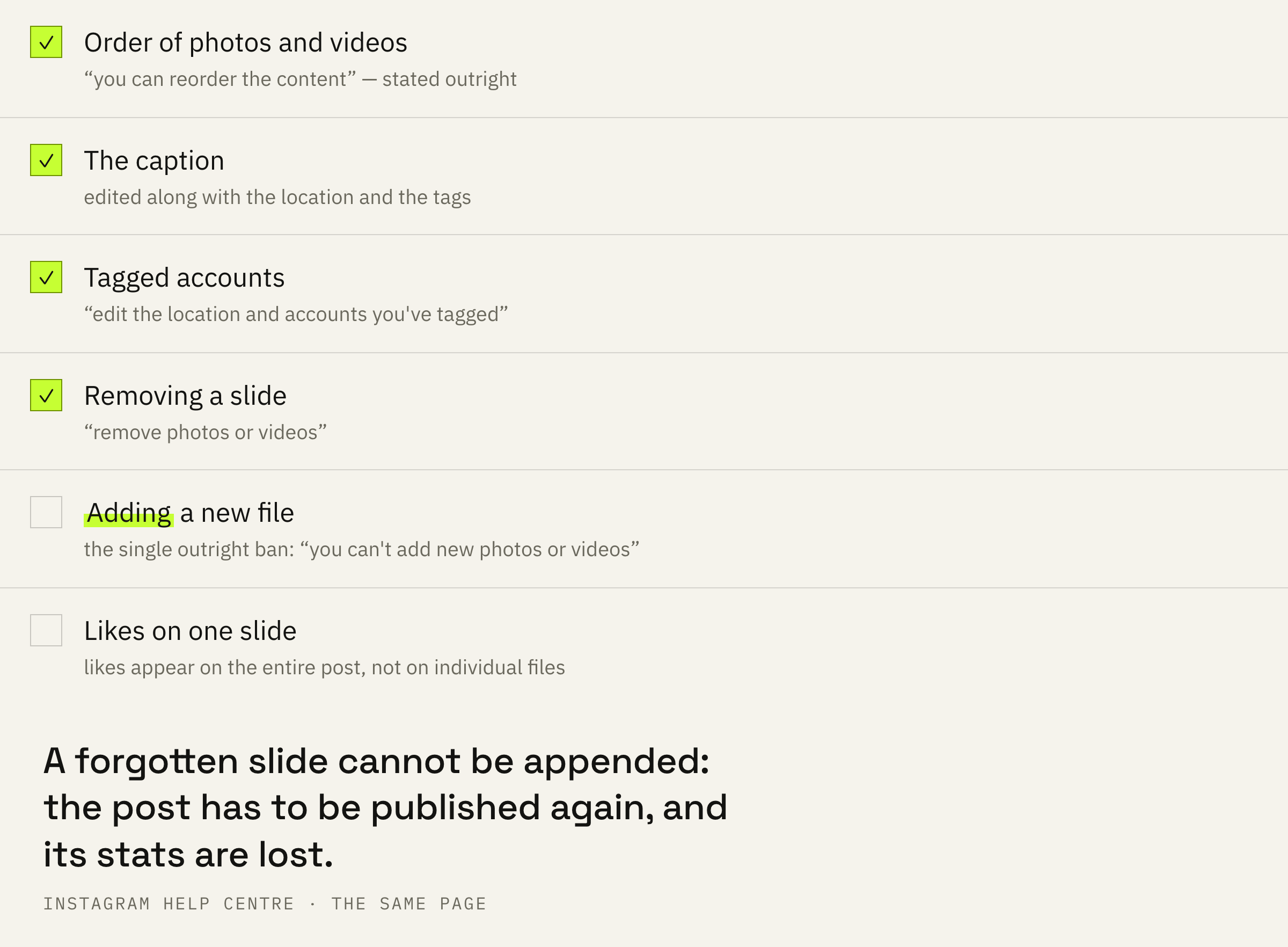
Hence a practical conclusion. A forgotten slide cannot be added later: the post has to be deleted and posted again, losing its statistics and comments. A mixed up order, on the contrary, is fixed in ten seconds.
There is also a detail that changes how the numbers are read.
Comments and likes appear on the entire post, rather than on the individual photos and videos that are part of your post.
Instagram Help Centre · the same page
So likes will not tell you which slide people liked. Post insights count the carousel as one object, and comparison inside it has to rely on indirect signs such as completed views.
The workflow and three mistakes
What to do before publishing so that nothing has to be redone.
First: choose the orientation before the shoot and shoot the whole series in it.
Second: gather all the files in advance and check the order in the preview. After publishing the order can be edited, but a forgotten file can no longer be added.
Third: decide what the video is doing. If it has to bring new viewers, it needs a clip of its own.
Fourth: publish on a stable network, especially when there are several videos in the post.
Before publishing, ask one question: what do you expect from this material. If new viewers, part of the work has to go into a separate clip. If the attention of those who already read you, the carousel is in its place.