Reposts on Instagram: followers “may see”, and you cannot repost a repost
The help page promises followers only “may see”, a repost lives on a separate tab, comments go to Direct, and the creator closes reposts with a toggle.
- Social media and AI
- Mechanics breakdown
- ≈ 8 minutes
The repost button appeared on Instagram recently, and two expectations already live around it: that a repost “duplicates the post into your feed” and that someone else’s successful reel can be “run past your own followers” this way. About showing it to followers, the help page uses one word: “may”. Further on, the same document lists what cannot be reposted, where the comments go, and how the creator closes reposts of their content with a single toggle.
Under what condition followers will see your repost. Where it sits in the profile and where the comments on it arrive. What cannot be reposted. How a creator forbids reposts of their content and what happens to other people’s reposts when the account goes private. Eight minutes of reading.
Followers “may see”
One word in the help page that cancels the idea of a repost as a broadcast.
Let us start with what the platform promises about delivery.
You can repost public reels or posts on Instagram. When you repost, your followers may see that you reposted in their feeds, and reposts will appear in a dedicated repost tab on your profile.
Instagram Help · “Repost a reel or a post on Instagram”
Three facts here. Only public content can be reposted. Followers “may see” a repost, and that word in the document is not accidental. A repost lives on a dedicated profile tab; it is not in the grid.
The next paragraph specifies the condition for delivery, and it is stricter than it seems.
Your followers may be able to see your repost if they come across that piece of content. Other Instagram users can comment on your repost and these comments will appear as direct messages to you. Keep in mind, you can only repost reels or posts if the original creator allows reposts of their content.
Instagram Help · the same page
It reads like this: a repost creates no new delivery. A follower will see your mark if that post comes their way anyway. So reposting someone else’s reel does not bring your followers to it; it only adds your name to a view that would have happened regardless.
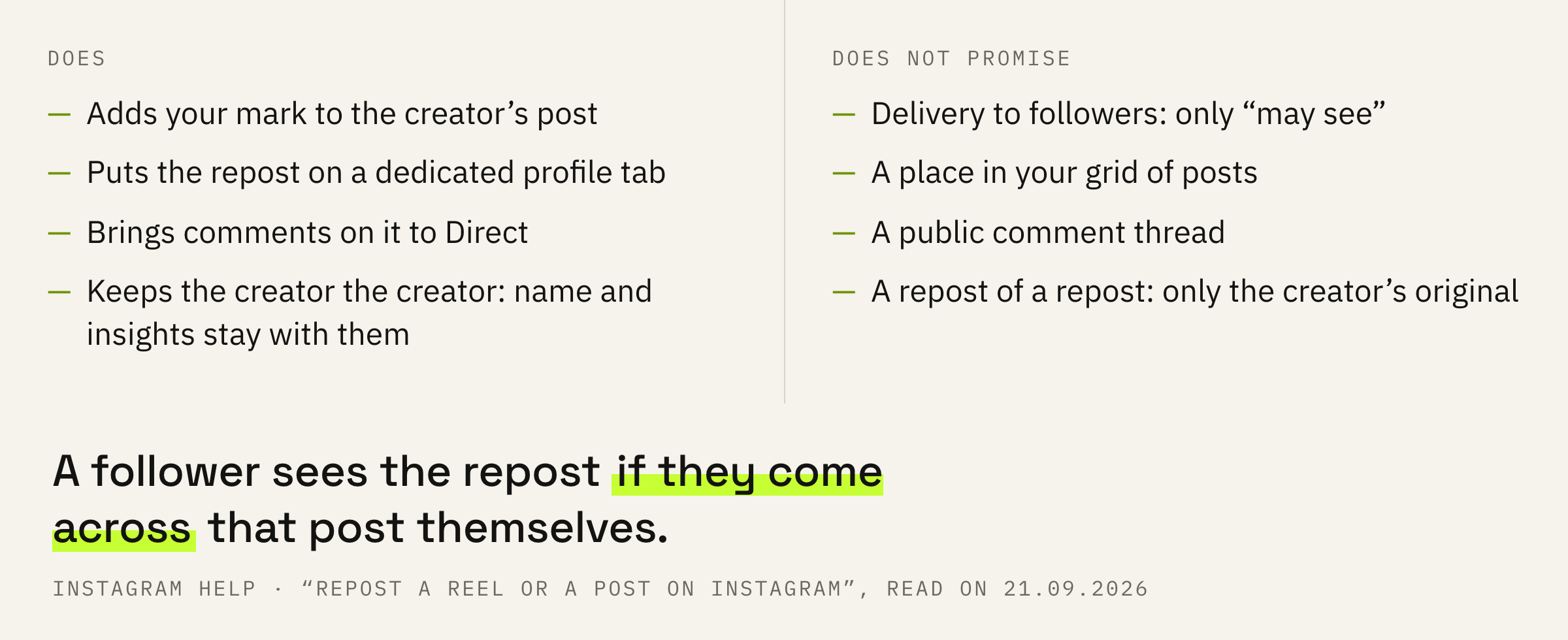
“I’ll repost and my followers will see it” is not written in the help page. It says “may see”, and the condition is named: if they come across that post themselves. Counting on a repost as a way to bring someone else’s content to your own audience is at odds with the document.
We'll look at your account and tell you what in it actually gets impressions from followers and what to replace reposts with in the plan.
A separate tab and comments in Direct
Where a repost sits and why there is no discussion under it.
Two details from the same two paragraphs that are skipped most often.
First: reposts are collected on a dedicated profile tab. They do not get into the main grid, so the look of the profile does not change with reposts, and someone who came to look at your work will not see other people’s content among it.
Second: comments on a repost arrive as direct messages. No public discussion forms under a repost; a reply to a comment goes to Direct.
The page opens with a caveat: “This feature may not be available to everyone”. If you have no repost button, that is the state of the platform, not a settings error.
If the task is for someone else’s post to appear in your own grid and to your followers, the platform has a different mechanism for that, and a collab differs from a tag precisely in that the post goes out in both profiles.
Only the original, and only with permission
Two prohibitions that stand in the note and in the last line of the paragraph.
The first prohibition is short.
Note: Only content posted by the original creator can be reposted. You cannot repost a repost.
Instagram Help · the same page
The “repost of a repost of a repost” chain, along which content would spread on its own, is closed by the platform: only the creator’s post gets reposted. The second prohibition stands a line above and concerns permission: a repost is possible “only if the original creator allows reposts of their content”.
Uploading someone else’s reel as your own file is a separate conversation. That is no longer a repost, and the platform describes such content as unoriginal, with its own consequences for recommendations.
A repost keeps the creator the creator: the name, the post and its insights stay with them. If a reel already carries a repost mark, it cannot be reposted further; you need to find the original.
How a creator turns reposts off
One toggle for all content and one button for all reposts.
The creator’s permission is not an abstraction but a setting. The help page describes the way to it like this: under “How others can interact with you”, tap “Sharing and reuse” and toggle “Reposts on posts and reels”.
Your own reposts of other people’s content are also collected in one place: “Your activity”, then “Reposts”. From there they are deleted as a list, not one by one from the profile tab.
The toggle closes reposts for the future. What happens to reposts made earlier, the help page describes on another page, and that is the next section.
A private account and 24 hours
The page on reuse, where it says what gets deleted and what stays.
A repost is a special case of reuse of your content, and it has a help page of its own. The main line on it is about a private account.
If you switch from public to private account: All reels, posts or stories using your content will be deleted if you set your account to private for longer than 24 hours.
Instagram Help · “Reuse of media on Instagram”
This is the creator’s strongest tool: set the account to private for more than a day, and everything built on your content is deleted for everyone. A line above says the same about the permanent mode: on a private account no one can reuse photos, reels and feed videos.
The toggle from the previous section acts more gently.
If you turn off reuse, then reels, posts or stories using all or part of your reels, feed videos, and photos created before you changed your settings will stay on Instagram unless you delete your original content.
Instagram Help · the same page
So turning the setting off does not touch what has already been made. Other people’s derivatives can be removed either by deleting your original or by setting the account to private for more than 24 hours.
Note: You can’t turn off reuse of your original audio, text, or comments.
Instagram Help · the same page
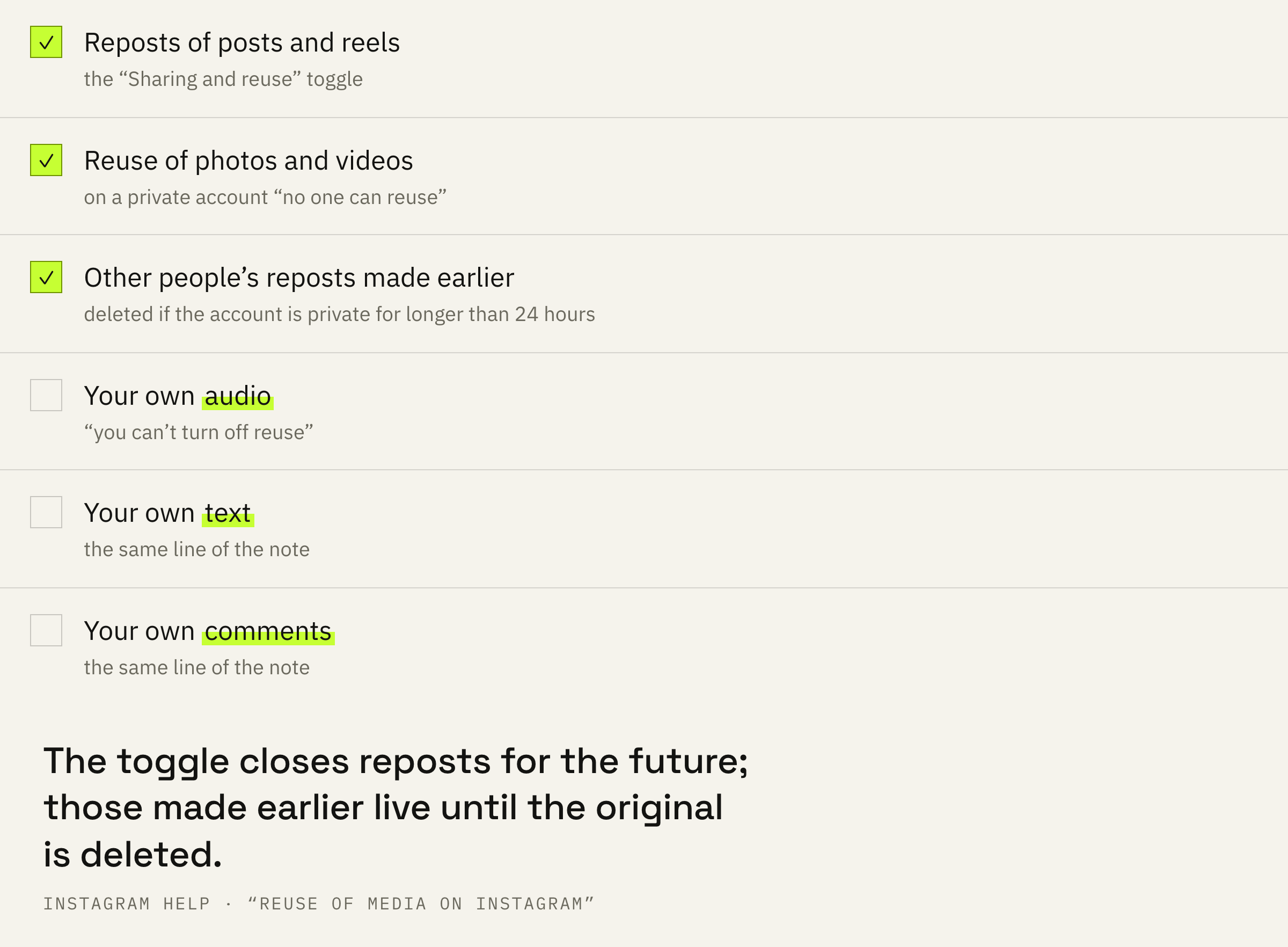
Audio, text and comments always remain available for reuse. And one more line from the same page: depending on the settings of the other user, your reused content may be discoverable in search engine results. Deleting the original works on its own terms, and it has its own deadlines.
Working order and three mistakes
What to decide before the first repost and before the first ban.
First: decide what the repost is for. If it is to bring someone else’s post to your own followers, the help page does not promise that; a collab exists for it.
Second: repost only the original. A post with a repost mark will have no button to go further.
Third: remember Direct. Comments on a repost will arrive as direct messages; there will be no public thread.
Fourth: if you are the creator and don’t want reposts, turn them off with the toggle. The ones already made will stay until the original is deleted or the account is private for more than 24 hours.
Before a repost, ask one question: the post has a creator and no repost mark. Before banning reposts, ask another: are you ready for the ones already made to stay.